Repositories
To create an experiment with LabBench, you must first have a protocol. Protocols are organised into protocol repositories. A protocol repository assigns a unique ID to each protocol, enabling tracing results back to the protocol that generated them, as this ID is embedded in all experimental data exported from LabBench.
Protocol repositories are collections of protocols that are assigned unique IDs. They can be used either as an authoritative source of protocols within a research group or across multiple groups, or as public repositories to disseminate protocols for reproduction by independent researchers.
By design, they require only a simple hosting infrastructure, typically made available to all scientists at academic institutions. Technically, at its core, a protocol repository is a directory organised in a very specific way, with a repository index file at its root.
Consequently, in its simplest form, a protocol repository requires no hosting infrastructure beyond a computer. However, working with a protocol repository without any hosting infrastructure comes with serious drawbacks:
- The repository needs to be manually copied to laboratory computers, making stale or incorrect versions extremely likely.
- It really only works if only one person is developing protocols, and that person is very careful at keeping the repository organised and versioned.
- There is no tracking of protocol changes, making it difficult to monitor them over time.
All of these drawbacks can be mitigated with source control such as Git (see section Source Control).
A protocol repository can be distributed to laboratory computers either by manually copying its contents to the computers or by hosting it online. All that is required to host it online is a web server capable of serving static files.
Repository structure
The repository uses a hierarchical, file-based structure with categories and protocols organised as directories containing executable files and documentation.
The root <repository id>/ directory contains repository.xml, which serves as the index for all categories and protocols, shared documentation files (README.md, .html, .xps), a style.css file, and a create_readme.bat script for generating HTML documentation that can be converted to XPS files (description pages).
Each <category id>/ directory groups protocols and includes its own documentation set and generation script, supporting independent category descriptions.
Each <category id>.<protocol id>/ directory represents a protocol and contains the experiment definition file (.expx), asset files, and related documentation. Naming conventions map directly to identifiers, directory structure, and documentation.
<repository id>/
├── <category id>/
│   ├── <category id>.xps
│   ├── create_readme.bat
│   ├── <category id>.html
│   ├── style.css
│   └── README.md
├── <category id>.<protocol id>/
│   ├── <category id>.<protocol id>.expx
│   ├── [protocol asset files]
│   ├── <category id>.<protocol id>.xps
│   ├── create_readme.bat
│   ├── <category id>.<protocol id>.html
│   ├── style.css
│   └── README.md
├── repository.xml
├── repository.html
├── repository.xps
├── create_readme.bat
├── style.css
└── README.md
Repository index
For a directory to be a protocol repository, it must have a repository.xml file at its root. This file mirrors the repository’s file structure and provides an index of all protocols within the repository, optionally with information on how they are organised into categories. It is required for the LabBench Designer to locate protocols and their assets within the repository and determine whether they are compatible with the currently installed version of LabBench.
Below is an example of the contents of a repository index file:
<?xml version="1.0" encoding="utf-8" ?>
<repository xmlns:xsi="http://www.w3.org/2001/XMLSchema-instance"
            xsi:noNamespaceSchemaLocation="https://files.labbench.io/xsd/6.0/repository.xsd"
            id="labbench.io"
            name="LabBench Protocol Repository">

    <category name="Getting Started" id="intro">
        <protocol id="intro.labbench"
            name="Introduction to LabBench"
            labbench-version="6.0"
            category="Psychometrics;Demonstration Protocol"/>

        <!-- Content omited for brevity -->
    </category>

    <category name="Nerve Excitability Testing (NET)" id="net">
        <category name="Sodium Channel Excitability Nociceptor Test (SCENT)" id="sent">
            <protocol id="net.scent.pharmacology"
                name="Sodium Channel Excitability Nociceptor Test (SCENT) [Pharmacology]"
                labbench-version="6.0"
                category="Nerve Excitability Testing;Perception Threshold Tracking" />
        </category>
    </category>

    <category name="Cuff Pressure Algometry" id="cpa">
        <!-- Content omited for brevity -->
    </category>

    <!-- Content omited for brevity -->
</repository>
The xmlns:xsi and xsi:noNamespaceSchemaLocation attributes are used by editors and XML tooling to enable autocomplete, validation, and structural guidance while authoring the file. The attribute xmlns:xsi="http://www.w3.org/2001/XMLSchema-instance" declares the xsi prefix and links it to the XML Schema instance standard, allowing the document to use schema-related attributes, while xsi:noNamespaceSchemaLocation="https://files.labbench.io/xsd/6.0/repository.xsd" specifies the location of the XML Schema (XSD) that defines the valid structure, element order, and constraints for the document when no XML namespace is used; together they indicate that the XML should conform to this schema. These attributes do not directly affect LabBench runtime behaviour.
Categories
A categories are defined with the <category> element:
<category name="Nerve Excitability Testing (NET)" id="net">
    <category name="Sodium Channel Excitability Nociceptor Test (SCENT)" id="sent">
        <protocol id="net.scent.pharmacology"
            name="Sodium Channel Excitability Nociceptor Test (SCENT) [Pharmacology]"
            labbench-version="6.0"
            category="Nerve Excitability Testing;Perception Threshold Tracking" />
    </category>
</category>
Each <category> element has the following attributes:
| Attribute | Type | Specification |
|---|---|---|
id |
string | Required. Unique identifier for the category. |
name |
string | Required. Human-readable name of the category. Must not be empty. Used for display in LabBench Designer. |
Additional behavior and structure:
- A
<category>can contain both<protocol>and nested<category>elements - Nesting is recursive, allowing hierarchical grouping of protocols
- The order of elements is preserved and significant for structure
- Categories act as containers and do not directly define executable content
Readme association:
- Each category may have an associated
<category id>.xpsdescription page
Protocols
A protocol is defined with the <protocol> element:
<protocol id="net.scent.pharmacology"
    name="Sodium Channel Excitability Nociceptor Test (SCENT) [Pharmacology]"
    labbench-version="6.0"
    category="Nerve Excitability Testing;Perception Threshold Tracking" />
Each <protocol> element has the following attributes:
| Attribute | Type | Specification |
|---|---|---|
id |
string | Required. Unique identifier for the protocol. Must not be empty. Used to resolve the experiment definition file (<id>.expx) and associated assets. |
name |
string | Required. Human-readable name of the protocol. Must not be empty. Used for display in LabBench Designer. |
labbench-version |
string | Required. Specifies the LabBench version the protocol targets. Must match the format major.minor or major.minor.patch (e.g., 6.0, 6.0.1). Used to determine compatibility with the installed LabBench version. |
category |
string | Optional. Semicolon-separated list of category names used for classification . |
Additional behavior:
-
The protocol identifier (
id) defines the expected experiment file name:<id>.expx -
Version compatibility is validated against the LabBench runtime:
- Matching major version (e.g.,
6.x) is required - Incompatible versions trigger upgrade actions (
ProtocolorSoftware) - Invalid version formats are treated as unknown compatibility
- Matching major version (e.g.,
Description pages
Description pages are human-readable representations of repository, category, and protocol documentation in XPS format. These description pages are typically generated from the README.md file as .html files using a conversion tool (e.g., Pandoc), and then printed to produce the .xps files displayed by LabBench Designer.
There are three types of description pages:
- Repository description: must be located at the root of the repository and named
repository.xps. - Category descriptions: must be located in the category directory
<category id>/and named<category id>.xps. - Protocol descriptions: must be located in the protocol directory
<category id>.<protocol id>/and named<category id>.<protocol id>.xps.
The .xps format (XML Paper Specification) is a fixed-layout document format developed by Microsoft. It preserves the exact visual appearance of a document, including layout, fonts, and graphics, similar to PDF files.
XPS files are typically generated by printing the HTML description page using the Microsoft XPS Document Writer, producing a portable, non-editable document suitable for distribution, archiving, and offline use.
However, this is purely a convention; any tool capable of generating XPS files may be used.
Generation from Markdown files
This section describes the workflow for generating fixed-layout description documents from Markdown source files. A README.md file is first converted into a styled HTML page. This page serves as an intermediate, human-readable representation. The HTML page is then printed to an XPS document using a virtual printer.
The batch create_readme.bat file:
pandoc README.md -o <protocol id>.html --css=style.css -s --columns=999
pause
converts a Markdown README into a standalone HTML description page.
Uses Pandoc to transform README.md into <protocol id>.html
-o <protocol id>.htmlspecifies the output file--css=style.cssapplies custom styling-sgenerates a complete HTML document (including header and body)--columns=999prevents line wrapping to preserve formattingpausekeeps the console window open after execution
Required tool:
- Pandoc: converts Markdown to HTML and other formats
Role of style.css:
- Defines the visual appearance of the generated HTML
- Controls layout, fonts, spacing, and colors
- Ensures consistent rendering across different systems and browsers
Converting HTML to XPS:
- Open
<protocol id>.htmlin a web browser - Use the print function (Ctrl+P)
- Select the Microsoft XPS Document Writer as the printer
- Save the output as a
.xpsfile
Required XPS printer:
- Microsoft XPS Document Writer: Built-in Windows virtual printer for creating XPS documents, if not available, enable it via Windows Features or install from system settings
Building repositories
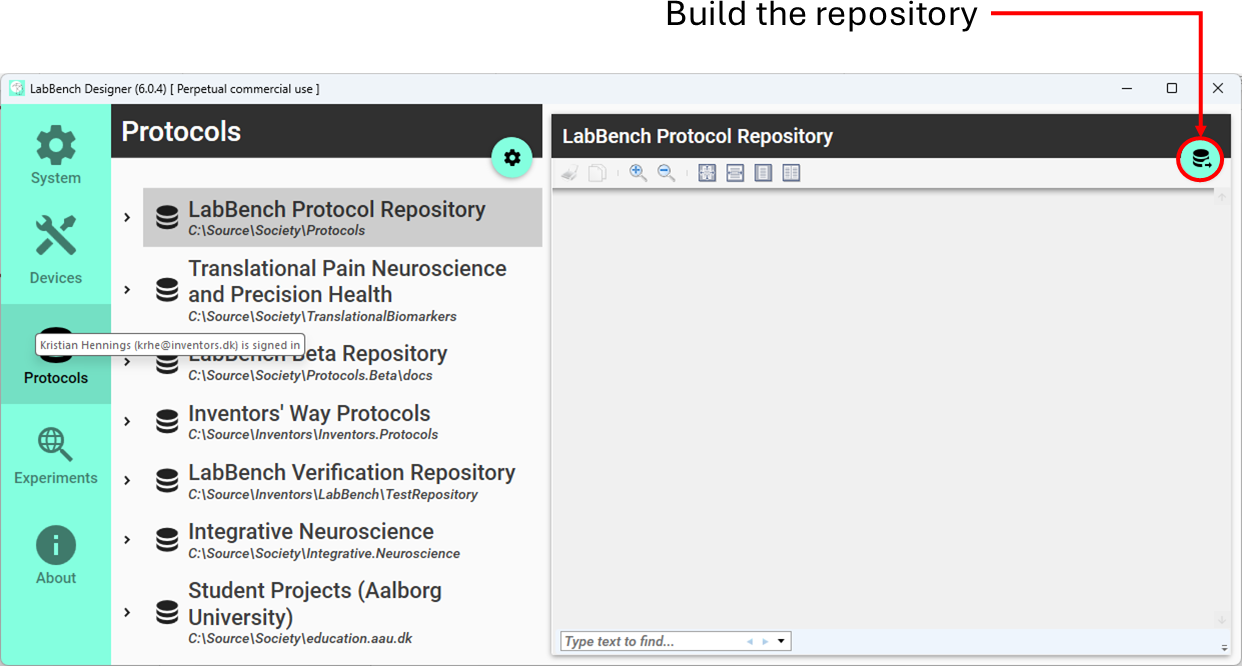
The source repository typically contains additional files that LabBench does not require to execute protocols, such as Markdown documentation (e.g., README.md), HTML description pages, batch scripts, styling resources, and source files used to generate images (e.g., PowerPoint or Adobe Illustrator files). These files support authoring, documentation, and asset creation but are not part of the runtime requirements.
During the build process, only the necessary files are copied to a dedicated build directory, including experiment definitions (.expx), required asset files, and repository metadata (e.g., repository.xml), producing a minimal, deployment-ready version of the repository.
As part of this process, a cache index is generated that contains the identifier of each file and its checksum. When content is requested, LabBench compares the locally cached file’s checksum with the checksum specified in the cache index retrieved from the server. If the checksums differ, the file is re-downloaded, and the local cache is updated, ensuring that only modified content is transferred.
Source control
Using Git for LabBench protocol repositories provides structured versioning and collaboration.
- Tracks all changes to protocols over time
- Enables reproducibility of experimental configurations
- Supports collaboration via branching and merging
- Allows version tagging for stable releases
- Provides remote backup and distribution
The following Git hosting services are suitable for repositories with hierarchical structures and mixed file types (XML, assets, documentation):
| Platform | Link | What it is |
|---|---|---|
| GitHub | github.com | Cloud-based Git hosting with collaboration features (issues, pull requests) and static site hosting (GitHub Pages). |
| GitLab | gitlab.com | Git hosting with integrated CI/CD; available as cloud or self-hosted. |
| Bitbucket | bitbucket.org | Git hosting integrated with Atlassian tools such as Jira and Confluence. |
| Azure DevOps Repos | dev.azure.com | Git repositories within the Azure DevOps ecosystem with pipeline and project integration. |
| Gitea | gitea.io | Lightweight, open-source Git hosting for self-hosted deployments. |
| Codeberg | codeberg.org | Non-profit Git hosting based on Gitea, suitable for open and collaborative projects. |