Manual Threshold Estimation
The manual threshold estimation procedure is used when LabBench cannot control the stimulus directly, and the experimenter must apply it manually. It consists of a response task and an estimation algorithm: the participant performs a perception task in which responses are classified as correct or incorrect, and an adaptive algorithm uses these outcomes to update estimates of the threshold or psychometric function. The stimulus is implicitly defined by the response task, and estimation is performed over an independent variable (x), where increasing x is assumed to increase the probability of a correct response.
The manual threshold estimation procedure is used to estimate thresholds/psychometric functions when LabBench cannot control the stimulus, and instead, the experimenter must manually apply the stimulus to the participant. Estimation of these thresholds/psychometric functions consists of two parts: response task and estimation algorithm:
- Response task: the perception task that the participant is asked to perform when the stimulus is presented. The outcome of this task is either correct: the participant perceived the stimulus correctly, or incorrect: the stimulus intensity was too low, and the participant failed to perceive the stimulus correctly.
- Estimation algorithm: the adaptive algorithm by which the threshold/psychometric function is estimated. This algorithm uses the outcome of the response task (correct/incorrect) to update the estimate of the threshold or psychometric function for each stimulus presentation.
The stimulus is defined by the nature of the questions asked in the response task. The thresholds or psychometric functions are estimated for an independent variable (x). An increase in x is assumed to increase the probability that the participant will correctly perform the response task.
The procedure window for the <psychophysics-manual-threshold-estimation> is shown in Figure 1.
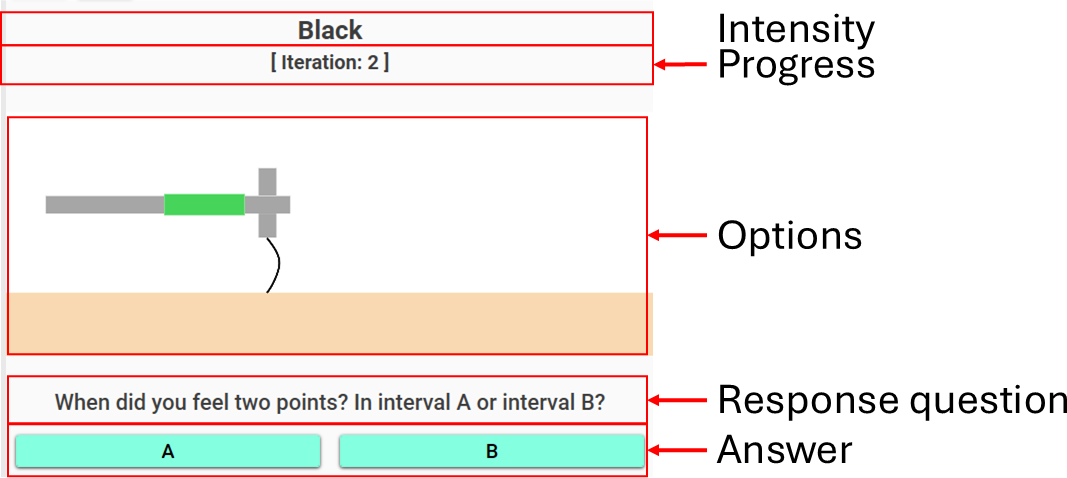
Figure 1: Procedure window for the manual threshold estimation procedure.
The interface consists of three main areas:
Intensity and Progress:
At the top of the interface, the current stimulus instruction and progress information are displayed:
-
Intensity label
- Displays the current stimulus level (e.g., Black or a physical value such as 5 mm).
- May reflect transformed intensities or user-defined labels.
-
Iteration counter
- Indicates the current trial number (e.g.,
[Iteration: 2]). - Corresponds to the number of completed stimulus-response cycles.
- Indicates the current trial number (e.g.,
This section provides the operator with clear guidance on what stimulus intensity to apply next and how far the procedure has progressed.
Stimulus guidance (Options):
The central panel presents visual guidance for the operator:
- Displays one or two images depending on the response task:
- Yes/No task: a single illustration of the stimulus
- Forced choice tasks:
- One-interval: a single image (randomized internally)
- Two-interval: two images representing intervals A and B
This section ensures that the operator applies the stimulus consistently across trials.
Response question and answers:
At the bottom of the interface, the operator is guided to collect and record the participant’s response:
-
Question
- A dynamically generated instruction (e.g., “When did you feel two points?”)
- Defined in the response task configuration
-
Answer buttons
- Two response options labeled A and B
- The meaning depends on the task:
- Yes/No: typically mapped to negative/positive responses
- Forced choice: corresponds to alternatives or intervals
-
The operator selects the participant’s response by clicking the appropriate button.
Procedure definition
A threshold estimation procedure can be defined with the <psychophysics-manual-threshold-estimation> element within the <procedures> element in the Experiment Definition File (*.expx):
<psychophysics-manual-threshold-estimation id="TPD_PSI_FC2I2A"
                                            name="Two-point Discrimination (Psi method, Forced Choice, One or two points)"
                                            stimulus-unit="mm">
    <catch-trials order="block-randomised"
                    instruction="Catch Trial"
                    image="TactileImages.OneProng"
                    interval="5" />
    <psi-algorithm number-of-trials="30"
                    intensities="[2,3,4,5,6,7,8,9,10,11,12,13,14,15]">
        <quick alpha="0.5" beta="1" gamma="0" lambda="0.02" />
        <beta type="linspace" base="10" x0="-1.2041" x1="1.2041" n="20"/>
        <alpha type="linspace" x0="2.0/15.0" x1="1" n="50" />
    </psi-algorithm>
    <two-interval-forced-choice-task interval-a="A"
                                        interval-b="B"
                                        no-stimulus-image="TactileImages.OneProng"
                                        stimulus-image="TactileImages.TwoProngs"
                                        question="When did you feel two points? In interval A or interval B?" />
</psychophysics-manual-threshold-estimation>
The <psychophysics-threshold-estimation> procedure has these procedure specific attributes:
| Attribute | Type | Specification |
|---|---|---|
stimulus-unit |
string | Unit of the stimulus intensity displayed to the operator (e.g., mm, g). This unit is appended to intensity values or used alongside transformed/labelled intensities to provide clear instructions for manual stimulus application. |
Adaptive methods
Up/Down
The Up/Down estimation algorithm (also known as a staircase method) is an adaptive procedure used to estimate perceptual thresholds by dynamically adjusting stimulus intensity based on the participant’s responses. The goal of the algorithm is to concentrate trials around the intensity level where the participant transitions from mostly incorrect to mostly correct responses—i.e., the perceptual threshold.
In the manual threshold estimation procedure, the operator applies the stimulus at the intensity specified by LabBench and records the participant’s response. The algorithm then updates the next intensity according to a simple rule:
- Correct response → decrease stimulus intensity
- Incorrect response → increase stimulus intensity
Because the manual variant operates on a predefined list of discrete intensities, the algorithm moves up or down within this list rather than applying continuous step changes. The size of this movement is controlled by the step size, which is initially larger to allow rapid convergence toward the threshold and is reduced after the first reversal to improve precision.
A reversal occurs when the direction of intensity change switches (e.g., from increasing to decreasing). These reversal points are critical, as they cluster around the participant’s threshold. The algorithm continues until a predefined number of reversals (stop-rule) has been reached. The threshold is then estimated from the intensities at the reversal points, excluding an optional number of initial reversals (skip-rule) to remove early, unstable estimates.
The Up/Down method is robust, efficient, and easy to interpret, making it well-suited for manual procedures where precise control of stimulus delivery is not available. It provides a reliable estimate of the threshold with relatively few trials while maintaining a straightforward interaction model for both operator and participant.
<up-down-algorithm stop-rule="6"
                    skip-rule="1"
                    initial-direction="increasing"
                    initial-step-size="2"
                    intensities="[2,3,4,5,6,7,8,9,10,11,12,13,14,15]"/>
which have the following attributes:
| Attribute | Type | Specification |
|---|---|---|
stop-rule |
int = Calculated(context) | Number of reversals required before the algorithm terminates. |
skip-rule |
int = Calculated(context) | Number of initial reversals that are ignored when computing the threshold estimate. |
initial-direction |
enum | Initial direction of intensity change. Can be increasing or decreasing. |
initial-step-size |
int = Calculated(context) | Initial step size in terms of index changes in the intensity array. After the first reversal, the step size is reduced to 1. |
intensities |
double[] = Calculated(context) | Ordered list of discrete stimulus intensities. Values must be sorted from lowest to highest. |
Psi-Method
The Psi method is a Bayesian adaptive estimation algorithm used to efficiently estimate a participant’s perceptual threshold or full psychometric function. Unlike staircase methods such as the Up/Down procedure, which primarily converge to a single threshold value, the Psi method explicitly models the relationship between stimulus intensity and response probability and updates this model after each trial.
In the manual threshold estimation procedure, the operator applies the stimulus at the intensity specified by LabBench and records the participant’s response. After each response, the Psi algorithm updates its internal probability distribution over the psychometric parameters (e.g., threshold and slope) and selects the next stimulus intensity that is expected to provide the greatest reduction in uncertainty.
This selection is based on an information-theoretic criterion: for each possible intensity, the algorithm evaluates how informative the expected response would be and chooses the intensity that maximizes information gain. As a result, trials are concentrated in the most informative regions of the psychometric function, leading to efficient estimation with relatively few trials.
The procedure continues for a predefined number of trials (number-of-trials), after which the final threshold and psychometric function parameters are derived from the posterior distribution. The Psi method is particularly well-suited for experiments where both accuracy and efficiency are important, and where a full characterization of perceptual performance is desired.
<psi-algorithm intensities='[2,3,4,5,6,7,8,9,10,11,12,13,14,15]'
                number-of-trials='30'>
    <quick alpha="0.5" beta="1" gamma="0" lambda="0.02" />
    <beta type="linspace" base="10" x0="-1.2041" x1="1.2041" n="20"/>
    <alpha type="linspace" x0="2.0/15.0" x1="1" n="50" />
which have the following attributes:
| Attribute | Type | Specification |
|---|---|---|
intensities |
double[] = Calculated(context) | Discrete set of stimulus intensities that the algorithm can select from. Values must be ordered from lowest to highest. |
intensity-labels |
string[] = Calculated(context) | Optional labels displayed instead of numeric intensities. Must have the same length as intensities. |
number-of-trials |
int = Calculated(context) | Total number of trials to perform. The algorithm terminates after this number of iterations. |
The <psi-algorithm> element is configured using a set of child elements that define the psychometric model and the parameter grids used during estimation.
Psychometric function
The <name-of-psychometric-function> element defines the psychometric function used by the Psi method. It specifies the functional form that links stimulus intensity to the probability of a correct (or positive) response.
Only the guess rate (γ/gamma) and lapse rate (λ/lambda) are actively used during estimation. The parameters alpha and beta are included for completeness but are not used by the algorithm.
| Attribute | Type | Specification |
|---|---|---|
alpha |
double = Calculated(context) | Ignore has no effect. |
beta |
double = Calculated(context) | Ignore has no effect. |
gamma |
double = Calculated(context) | Guess rate (lower asymptote of the psychometric function). For forced-choice tasks, typically 1/N. |
lambda |
double = Calculated(context) | Lapse rate representing stimulus-independent errors at high intensities. |
The <psi-algorithm> element is configured using a set of child elements that define the psychometric model and the parameter grids used during estimation.
Slope <beta>
The <beta> element defines the discrete grid of candidate slope values of the psychometric function. The grid is generated using an array generation algorithm and represents the possible steepness of the psychometric curve.
During the procedure, the Psi method maintains and updates a posterior distribution over these values.
| Attribute | Type | Specification |
|---|---|---|
type |
enum (linspace, logspace, geomspace, array) |
Algorithm used to generate the array of slope values. |
n |
double = Calculated(context) | Number of values to generate (rounded to nearest integer). Required for all generation types except array. |
x0 |
double = Calculated(context) | Start value of the range. |
x1 |
double = Calculated(context) | End value of the range. |
base |
double = Calculated(context) | Base used for logspace generation. |
value |
double[] = Calculated(context) | Explicit array of values used when type="array". |
Generation types:
linspace: Linearly spaced values betweenx0andx1logspace: Values computed asbase^xover a linear rangegeomspace: Geometric progression betweenx0andx1array: Values explicitly defined via script
Threshold <alpha>
The <alpha> element defines the discrete grid of candidate threshold values used by the Psi method. These values represent possible locations of the psychometric function along the intensity axis.
The grid is generated using the same array generation mechanism as <beta>.
| Attribute | Type | Specification |
|---|---|---|
type |
enum (linspace, logspace, geomspace, array) |
Algorithm used to generate the array of threshold values. |
n |
double = Calculated(context) | Number of values to generate (rounded to nearest integer). Required for all generation types except array. |
x0 |
double = Calculated(context) | Start value of the threshold range. |
x1 |
double = Calculated(context) | End value of the threshold range. |
base |
double = Calculated(context) | Base used for logspace generation. |
value |
double[] = Calculated(context) | Explicit array of values used when type="array". |
Notes:
- The
<alpha>values are typically normalized to the range[0, 1], depending on how intensities are defined. - The final threshold estimate is derived from the posterior distribution over these candidate values.
Response tasks
Yes/No
he Yes/No response task is a simple manual response paradigm in which the participant is asked a binary question about the applied stimulus. The operator presents the stimulus at the instructed intensity and records whether the participant reports perceiving the target sensation.
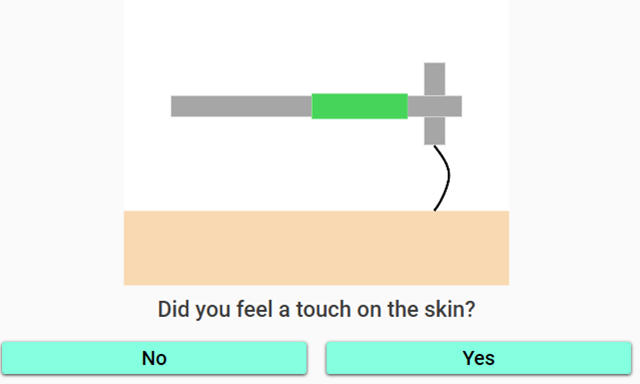
Figure 2: User interface of the Yes/No response task. The operator is presented with an illustration of the stimulus, a question to ask the participant, and two response options (“No” and “Yes”) used to record whether the stimulus was perceived.
The participant’s response is mapped to either a positive or negative outcome:
- A positive response indicates that the participant perceived the stimulus (e.g., “Two”).
- A negative response indicates that the participant did not perceive the stimulus or perceived an alternative (e.g., “One”).
Internally, the response is converted into a boolean value used by the estimation algorithm:
- Positive response → True (correct detection)
- Negative response → False (no detection)
The interface presents:
- A question that the operator asks the participant
- A task illustration image to guide stimulus application
- Two response options (A/B) corresponding to the negative and positive answers
This task is easy to understand and quick to administer, making it suitable for clinical and experimental settings where simplicity is important. However, because the participant decides whether a stimulus was perceived, the Yes/No task is susceptible to response bias. Participants may adopt conservative or liberal response strategies depending on expectation or uncertainty.
To mitigate this, the Yes/No task is often combined with catch trials, to detect false positives
A <yes-no-task> is defined with:
<yes-no-task question="Do you feel one or two points?"
             positive-answer="Two"
             negative-answer="One"
             task-illustration-image="TactileImages.TwoProngs" />
The Yes/No response task has the following attributes:
| Attribute | Type | Specification |
|---|---|---|
question |
dynamic text | The question asked to the participant for each trial. |
positive-answer |
dynamic text | The response indicating that the stimulus was perceived (mapped to True). |
negative-answer |
dynamic text | The response indicating that the stimulus was not perceived (mapped to False). |
task-illustration-image |
image = Calculated(context) | Image shown to the operator to illustrate how the stimulus should be applied. |
One Interval Forced Choice
The One Interval Forced Choice (1IFC) task is a manual response paradigm in which the participant is required to choose between two alternatives based on a single presented stimulus. Unlike the Yes/No task, the participant must always make a decision, even when uncertain.
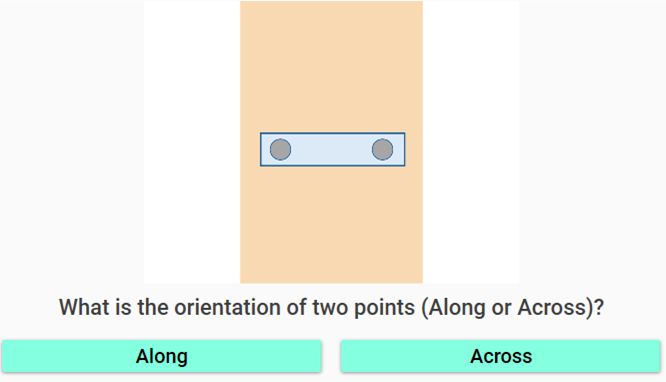
Figure 3: User interface of the One Interval Forced Choice (1IFC) task. A single stimulus is presented, and the operator asks the participant to identify which alternative was perceived (e.g., “Along” or “Across”), selecting between the two response options.
In each trial, the operator applies a stimulus corresponding to one of two possible alternatives. The selected alternative is randomized internally and is not known to the participant. After stimulus presentation, the operator asks the predefined question, and the participant must indicate which alternative they believe was presented.
The participant’s response is evaluated as either correct or incorrect:
Correct response → the chosen alternative matches the presented stimulus Incorrect response → the chosen alternative does not match the presented stimulus
If the stimulus intensity is sufficiently high, the participant is likely to identify the correct alternative. If the intensity is too low to be perceived reliably, the participant must guess, resulting in a chance performance level of 50%.
The interface presents:
A single stimulus illustration, corresponding to the selected alternative A question guiding the participant’s decision Two response options (A/B), representing the alternatives
Because the participant is forced to choose between alternatives on every trial, the One Interval Forced Choice task reduces response bias compared to Yes/No tasks. However, unlike multi-interval paradigms, it does not fully eliminate bias, as the participant may still rely on internal criteria when uncertain.
This task is commonly used in combination with the Psi method, where the known guess rate (50%) is incorporated into the psychometric model to improve estimation accuracy.
A <one-interval-forced-choice-task> is defined with:
<one-interval-forced-choice-task alternative-a-image="TactileImages.GratingAlong"
                                    alternative-a="Along"
                                    alternative-b-image="TactileImages.GratingAcross"
                                    alternative-b="Across"
                                    question="What is the orientation of two points (Along or Across)?"/>
The One Interval Forced Choice response task has the following attributes:
| Attribute | Type | Specification |
|---|---|---|
alternative-a-image |
image = Calculated(context) | Image used to illustrate alternative A to the operator. |
alternative-b-image |
image = Calculated(context) | Image used to illustrate alternative B to the operator. |
alternative-a |
dynamic text | Label for alternative A (expected response when this alternative is perceived). |
alternative-b |
dynamic text | Label for alternative B (expected response when this alternative is perceived). |
question |
dynamic text | The question asked to the participant for each trial. |
Two Interval Forced Choice
The Two Interval Forced Choice (2IFC) task is a manual response paradigm in which the stimulus is presented in one of two intervals, and the participant must indicate in which interval the stimulus occurred. Unlike Yes/No tasks, the participant is always required to choose between the two intervals, even when uncertain.
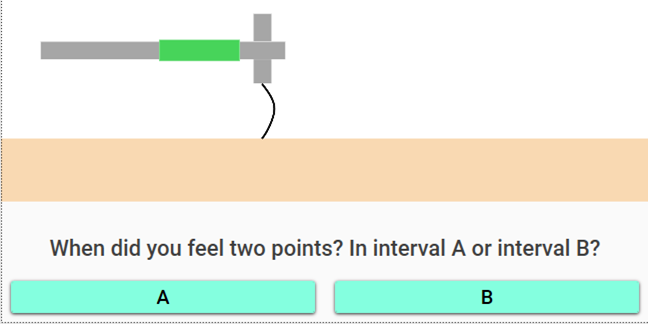
Figure 4: User interface of the Two Interval Forced Choice (2IFC) task. The operator presents two stimulus intervals and asks the participant to indicate in which interval the stimulus was perceived, selecting either A or B.
In each trial, the operator applies the stimulus twice in sequence—once in each interval. One interval contains the target stimulus, while the other contains a non-stimulus or baseline condition. The order of these intervals is randomized internally by LabBench and is not known to the participant.
After both intervals have been presented, the operator asks the predefined question, and the participant selects the interval (A or B) in which they believe the stimulus was presented.
The participant’s response is evaluated as:
- Correct response → the selected interval matches the interval containing the stimulus
- Incorrect response → the selected interval does not match the stimulus interval
If the stimulus intensity is sufficiently high, the participant will reliably identify the correct interval. If the intensity is too low to be perceived, the participant must guess, resulting in a known chance level of 50%.
The interface provides:
- Two visual cues representing interval A and interval B
- A question guiding the participant’s decision
- Two response options corresponding to the intervals
Because the participant must always choose between intervals, the Two Interval Forced Choice task strongly reduces response bias compared to Yes/No tasks. The known chance level also makes it well-suited for use with adaptive algorithms such as the Psi method, where the guess rate is explicitly modeled.
A <two-interval-forced-choice-task> is defined with:
<two-interval-forced-choice-task interval-a="A"
                                    interval-b="B"
                                    no-stimulus-image="TactileImages.OneProng"
                                    stimulus-image="TactileImages.TwoProngs"
                                    question="When did you feel two points? In interval A or interval B?" />
The Two Interval Forced Choice response task has the following attributes:
| Attribute | Type | Specification |
|---|---|---|
interval-a |
dynamic text | Label/name of interval A presented to the participant (e.g., “A”). |
interval-b |
dynamic text | Label/name of interval B presented to the participant (e.g., “B”). |
no-stimulus-image |
image = Calculated(context) | Image illustrating the interval in which no stimulus should be applied. |
stimulus-image |
image = Calculated(context) | Image illustrating the interval in which the stimulus should be applied. |
question |
dynamic text | The question asked to the participant after both intervals are presented. |
Catch Trials
Catch trials are special trials in which no stimulus, or the equivalent of no stimulus, is presented to the participant. They are included to assess the participant’s tendency to report perceiving a stimulus when none is present (i.e., false positives), and are therefore an important tool for evaluating response bias and data reliability.
In the manual threshold estimation procedure, catch trials are interleaved with regular trials according to a predefined schedule (e.g., every n trials or using a randomized order). During a catch trial:
- The operator is instructed not to apply the stimulus (or to apply a neutral baseline condition)
- The participant is asked the same question as in regular trials
- The response is recorded and treated like any other trial outcome
Catch trials are fully integrated into the procedure workflow and are handled transparently by the estimation algorithm.
When a catch trial is active, the interface may be modified to guide the operator:
- An optional instruction (e.g., “Catch Trial”) is displayed instead of the normal intensity instruction
- An optional image is shown to illustrate that no stimulus should be applied
- Any stimulus-related images from the response task may be replaced by the catch trial image
These modifications ensure that the operator clearly distinguishes catch trials from regular trials while maintaining a consistent interaction flow.
Catch trials are particularly important in tasks such as Yes/No paradigms, where participants may adopt liberal response strategies. By measuring responses in the absence of a stimulus, catch trials provide insight into the participant’s baseline response behavior and help improve the interpretation of threshold estimates.
Catch trials are defined with:
<catch-trials order="block-randomised"
                instruction="Catch Trial"
                image="TactileImages.OneProng"
                interval="5" />
Catch trials <catch-trials> has the following attributes:
| Attribute | Type | Specification |
|---|---|---|
order |
enum | Defines how catch trials are scheduled within the procedure. See table below. |
interval |
int | Controls how often catch trials occur. Interpretation depends on order: fixed interval, block size, or probability denominator. |
instruction |
string = Calculated(context) | Optional instruction shown to the operator during catch trials. |
image |
image = Calculated(context) | Optional image displayed to guide the operator during catch trials. |
Catch Trial Order Modes:
| Value | Description |
|---|---|
deterministic |
Catch trials occur at a fixed interval. A catch trial is inserted every interval trials (specifically at position interval - 1 within each cycle). |
block-randomised |
Exactly one catch trial occurs within each block of interval trials. The position of the catch trial within each block is randomised. |
randomised |
Each trial has a probability of 1 / interval of being a catch trial. Catch trials are distributed randomly across the procedure. |
Scripting
The result of the procedure has the following properties that can be accessed by calculated parameters:
| Property | Type | Description |
|---|---|---|
Completed |
bool | Indicates whether the procedure completed successfully. |
Failed |
bool | Indicates whether the procedure failed (e.g., no valid threshold found). |
Responder |
bool | Indicates whether estimations stop algorithm was fulfilled. |
Threshold |
double | Estimated threshold value. |
MaxIntensity |
double | Maximum intensity used during the procedure. |
Intensities |
double[] | Sequence of stimulus intensities presented during each trial. |
Responses |
double[] | Participant responses for each trial (typically 1 = correct, 0 = incorrect). |
IsCatchTrial |
double[] | Indicates whether each trial was a catch trial (1 = catch trial, 0 = normal). |
Alpha |
double[] | Estimated alpha values (threshold parameter) over trials (Psi method). |
Beta |
double[] | Estimated beta values (slope parameter) over trials (Psi method). |
NumberOfResponses |
int | Total number of responses recorded. |