Sequential
The sequential procedure enables state machines to implement experimental procedures. Unlike most other procedures, it has no base functionality that can be configured in the LabBench Language; instead, its functionality must be implemented by a Python script that is called from its procedure events and state events.
The purpose of the sequential procedure is to allow you to define procedures for which there is no ready-made LabBench procedure. Consequently, it is fundamentally different from all other LabBench procedures: whereas other LabBench procedures allow you to extend their functionality with Python code, the functionality of a sequential procedure must be implemented in Python.
The procedure assumes that the procedures to be implemented can be described with state machines. State machines are a formal way of describing systems that can exist in a finite number of discrete states. The core concept is the transitions that move the system from one state to another.
The procedure window for the sequential procedure is shown in Figure 1. Since the sequential procedure lacks built-in functionality, this window contains three UI elements to provide information to the operator. However, the use and functionality of these elements must be implemented in the Python code that drives the procedure’s state machine.
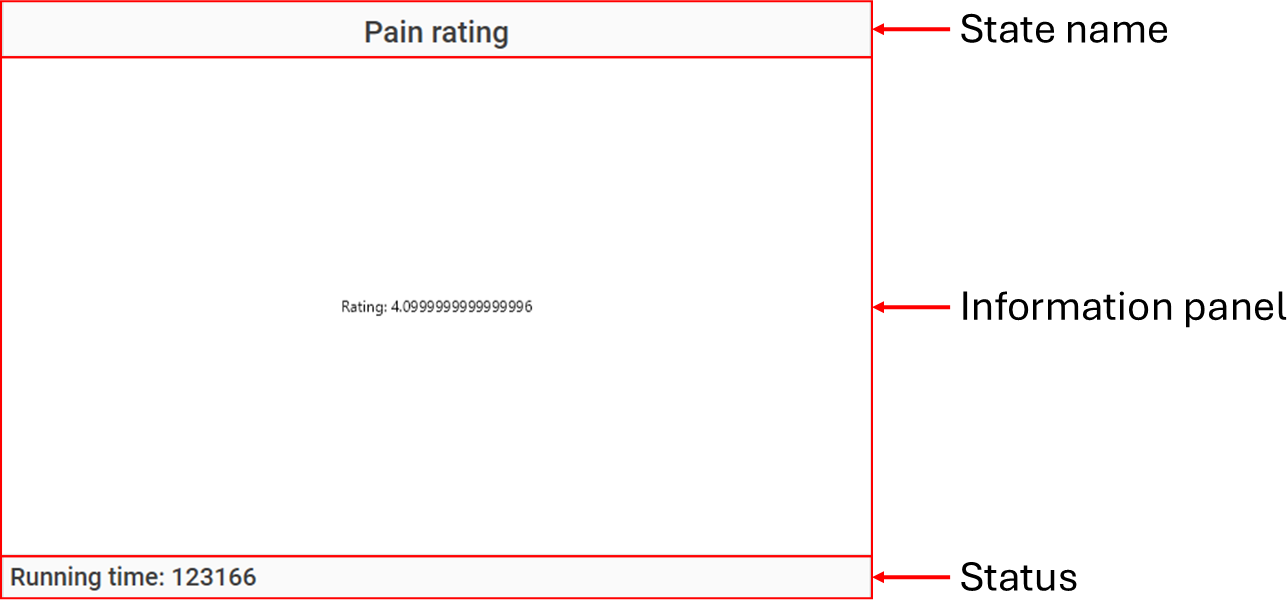
Figure 1: Procedure window for the sequential procedure
The procedure window displays the current state name, an information panel, and a status message for the operator. The name is automatically set by the procedure, whereas the information panel and status message can be set by the Python code that implements the state machine.
Procedure definition
A Sequential procedure can be defined with the <sequential> element within the <procedures> element in the Experiment Definition File (*.expx):
<sequential id="PainRatingTask"
    name="Pain expectancy"
    experimental-setup-id="image">
    <procedure-events start="Task.Start()"
                      complete="Task.Complete()">
        <instrument interface="pressure-algometer" />
        <instrument interface="ratio-scale" />
        <instrument interface="button" />
        <instrument interface="image-display" />
    </procedure-events>

    <dependencies>
        <dependency id="SR" />
    </dependencies>

    <update-rate-deterministic value="50"/>

    <states update="Task.Update()"
            enter="Task.Enter(SR)"
            leave="Task.Leave()">
        <state id="CROSS"       experimental-setup-id="image" name="Fixation cross"/>
        <state id="SELECTION"   experimental-setup-id="image" name="Selecting a cue" />
        <state id="DISPLAY"     experimental-setup-id="image" name="Display selected cue" />
        <state id="STIMULATION" experimental-setup-id="image" name="Stimulation" />
        <state id="RATING"      experimental-setup-id="vas"   name="Pain rating" />
        <state id="RESET"       experimental-setup-id="vas"   name="Reset rating" />
        <state id="PAUSE"       experimental-setup-id="image" name="Pause" />
    </states>
</sequential>
The Sequential procedure have no procedure specific attributes.
Definition of states
States are defined within the <states> element:
<states update="Task.Update()"
        enter="Task.Enter(SR)"
        leave="Task.Leave()">
    <state id="CROSS"       experimental-setup-id="image" name="Fixation cross"/>
    <state id="SELECTION"   experimental-setup-id="image" name="Selecting a cue" />
    <state id="DISPLAY"     experimental-setup-id="image" name="Display selected cue" />
    <state id="STIMULATION" experimental-setup-id="image" name="Stimulation" />
    <state id="RATING"      experimental-setup-id="vas"   name="Pain rating" />
    <state id="RESET"       experimental-setup-id="vas"   name="Reset rating" />
    <state id="PAUSE"       experimental-setup-id="image" name="Pause" />
</states>
The <states> element has the following attributes:
| Attribute | Type | Definition |
|---|---|---|
| enter | bool = Calculated(context) | A calculated attribute, that is executed when the state is entered. If it returns False the procedure is aborted. |
| update | string = Calculated(context) | A calculated attribute that is executed periodically. This attribute must return a string that controls whether the state machine will; "*": stay in the current state, "[id]": go to the state with id, "abort": abort the procedure, "complete": complete the procedure. |
| leave | bool = Calculated(context) | A calculated attribute, that is executed when the state is left. If it returns False the procedure is aborted. |
The update calculated parameter is executed with the period defined by the <update-rate> element. Each state is defined with <state> elements within the <states> element, these states have the following attributes:
| Attribute | Type | Definition |
|---|---|---|
| id | string | ID of the procedure state. Must be unique, and not one of the reserved keywords for state or procedure transitions. These keywoards are, *, abort, and complete. |
| name | string | This optional attribute specifies a human readable name for the procedure state. If it is not specified the ID of the procedure state will be used instead. |
| experimental-setup-id | string | This optional attribute, specifies the ID of the experimental setup that will be active will the procedure state is active. If none is specified the experimental setup for the procedure will be used instead. |
Implementation of states
States are implemented by calling the enter, update, and leave attributes specified for the
The example below provides a skeleton for the class that implements such a state machine:
import random

class ResponseTask:
   def __init__(self, context):
      self.context = context
      # State machine initialization code is omited for brevity.

   def Start(self):
      # Initialize the object for the start of the procedure
      return True

   def Complete(self):
      # Save data collected during the procedure to the result (self.context.Current)
      return True

   def PlotRating(self, x, y):
      with self.tc.Image.GetCanvas(x, y, "#FFFFFF") as image:
         # Example of generating an image for the information panel of the procedure window
         # This function is then set to the CurrentState object:
         #     self.tc.CurrentState.SetPlotter(lambda x, y: self.PlotRating(x,y))
         return image.GetImage()

   def Enter(self, srTest):
      id = self.tc.CurrentState.ID
      display = self.tc.Instruments.ImageDisplay
      self.tc.Instruments.Button.Reset();

      if id == "CROSS":
         display.Display(self.Cross)
      # Other states omited for brevity

      return True

   def Leave(self):
      return True

   def Update(self):
      id = self.tc.CurrentState.ID

      if id == "CROSS":
         return "*" if self.tc.CurrentState.RunningTime < 1000 else "SELECTION"

      if id == "SELECTION":
         if self.tc.CurrentState.RunningTime > 4000:
            # Selecting the lure, omited for brevity
            return "DISPLAY"
         if self.tc.Instruments.Button.IsLatched("1"):
            # Selecting the cue assigned to button 1, omited for brevity
            return "DISPLAY"
         if self.tc.Instruments.Button.IsLatched("2"):
            # Selecting the cue assigned to button 2, omited for brevity
            return "DISPLAY"

      # Other states omited for brevity

      return "*" # Stay in the current state

def CreateTask(tc):
   return ResponseTask(tc)
This class is then instantiated as a variable named Task in the variables element of the protocol:
<variables>
    <variable name="Task" value="func: Script.CreateTask(tc)" />
</variables>
Only a skeleton example of a state machine is provided here that can serve as a starting point for the implementation of your own state machines/sequential procedures. This skeleton is derived from the example protocol Introduction to sequential procedures that you can refer to for a full working example of a sequential procedure.
Access to instruments
Access to instrument is achieved by declaring them in the <procedure-events> element:
<procedure-events start="Task.Start()"
                    complete="Task.Complete()">
    <instrument interface="pressure-algometer" />
    <instrument interface="ratio-scale" />
    <instrument interface="button" />
    <instrument interface="image-display" />
</procedure-events>
These instruments will then be available in both the calculated parameters for the <procedure-events> and <states> elements.
Exchange of information
Exchange of information between the procedure and python code is through the ProcedureContext context. Both procedure events and state events have access to a context.CurrentState object that provides:
| Member | Type | Description |
|---|---|---|
| ID | string(readonly) | The State ID of the currently active state. |
| RunningTime | int(readonly) | The running time in milliseconds of the currently active state. |
| Name | string(readonly) | Name of the currently active state. |
| Status | string | A text that will be shown to the operator in the procedure window. Can be set by the events to provide information to the operator. |
| SetPlotter(lambda x,y) | method | Events can set a Python function that must generate an image that will be shown to the operator in the procedure window. |
Results
Scripts can create or update named result entries using strongly typed setter methods. If an entry with the given name already exists, it is replaced; otherwise, it is added.
Scalar values:
SetBool(name, value)SetInteger(name, value)SetNumber(name, value)SetString(name, value)
List values:
SetBools(name, values)SetIntegers(name, values)SetNumbers(name, values)SetStrings(name, values)
Example:
class Task:
    def Complete(self):
        self.context.Current.SetNumber("threshold", self.current_level)
        self.context.Current.SetNumbers("reversals", self.reversal_levels)
        self.context.Current.SetBool("criterion_met", True)
Scripting
Result data are accessed from scripting using dot notation based on the test ID, followed by the name of the stored result entry. Each named entry is exposed as a dynamic property and automatically converted to a native Python type (e.g. bool, int, float, str, or lists thereof).
The general access pattern is:
<TestID>.<name>
If the named result entry does not exist, the expression evaluates to None.
Example:
def Start(tc):
    # Access a scalar result value
    threshold = tc.SequentialTest01.threshold

    # Use the value in a conditional expression
    if tc.SequentialTest01.criterion_met:
        print("Stopping criterion reached")

    # Access a list-valued result
    reversals = tc.SequentialTest01.reversals