Researchers
LabBench uses role-based access control. When LabBench is installed, this system is disabled, meaning anyone opening LabBench has full access, including the ability to perform potentially destructive actions such as deleting data or entire studies.
For single-researcher environments or environments that can rely on computer logins, this may be acceptable. However, in multiple-researcher environments, it may be required to restrict access to certain actions, which can be accomplished by enabling the Access Control system.
Roles and permissions
The access control system is based on three roles: administrator, investigator, and operator, where each role provides access to the following actions:
| Action | Operator | Investigator | Administrator | |
|---|---|---|---|---|
| System | ||||
| Configure logging | ✔ | |||
| Configure access control | ✔ | |||
| Calibrate display | ✔ | |||
| License management | ✔ | |||
| Researchers | ||||
| Add researcher | ✔ | |||
| Set your own password | ✔ | ✔ | ✔ | |
| Set the password of any researcher | ✔ | |||
| Delete researcher | ✔ | |||
| Devices | ||||
| Add devices | ✔ | ✔ | ✔ | |
| Remove devices | ✔ | ✔ | ✔ | |
| Protocols | ||||
| Configure reposities | ✔ | |||
| Create experiments | ✔ | |||
| Experiments | ||||
| Add users to experiments | ✔★ | ✔ | ||
| Delete experiments | ✔★ | ✔ | ||
| Export data | ✔★ | ✔ | ||
| Configure devices | ✔★ | ✔ | ||
| Rerun post-session actions | ✔★ | ✔ | ||
| Run experiment in LabBench Runner | ✔★ | ✔★ |
★ only to experiments that the researcher has access to
Managing researchers
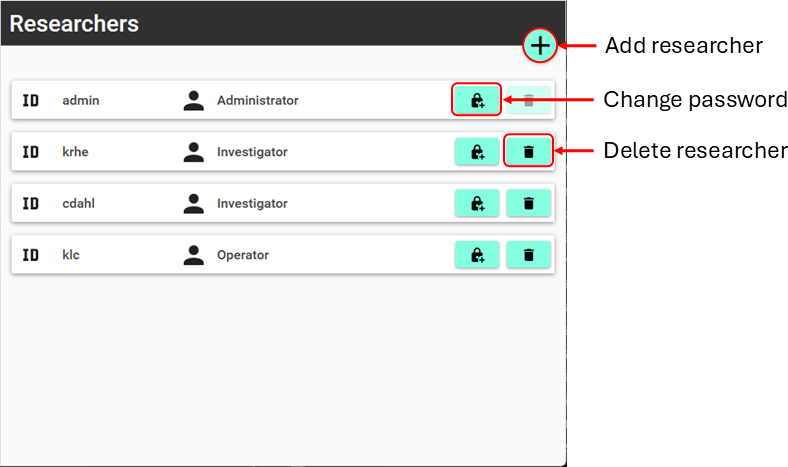
Management of researcher is done on the Reserchers tab of LabBench Designer (see Figure 1).
Adding researchers
An Administrator can add researchers to the system. To add a researcher, click the “Add researcher” button.
This will open the Add User dialog:
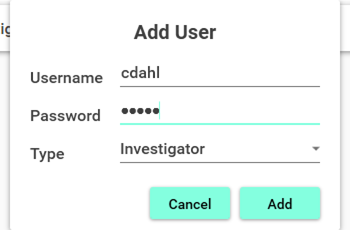
In the Add User dialogue, choose a username, password, and role for the new researcher to be added to the system. The password can be left blank, allowing the researcher to log in without a password.
Setting passwords
A researcher can always change their own password. An administrator can change any researcher’s password.
Deleting researchers
Researchers can be deleted from the system by an administrator.
Disabling access control
Access control can be turned off by an administrator deleting all other researchers from the system, afterwhich they can delete their own account.
All other researchers must first be deleted before the final administrative account can be deleted. This is to avoid an accidental lockout from the system.