Stimulation Sequence
The <stimulation-sequence> procedure generates stimulus sequences for evoked potentials, behavioural tasks,
or similar procedures. Construct the sequence by creating a stimulus pattern to control timing and a
stimulus set to define which stimuli are delivered.
The stimulation pattern <stimulation-pattern>is constructed from a composition of sequences, which
can be deterministic or random. However, to use this procedure, the stimulation pattern (number of stimuli
and randomisation) is generated when the procedure starts. Consequently, it is not possible to change the
stimulation pattern while the procedure is running, so it cannot depend on participant performance during
the procedure. Use the <sequential> procedure if the stimulation pattern depends on the participant, as that
procedure is more versatile but also more complex to implement than this stimulation sequence procedure.
The stimulation pattern is first generated, yielding a set of temporal stimulation slots will be
filled with stimuli; which stimuli are inserted into these stimulation slots is defined by the stimulus
set <stimuli>. The stimuli set defines a set of stimuli and controls their randomisation. To fill
the stimulation pattern, a batch of stimuli is first generated by the stimulus set. This batch of
stimuli are inserted into the stimulation slots until all have been allocated, then a new batch is
generated. This process is repeated until all stimulation slots have been allocated a stimulus.
The procedure delivers stimuli via the stimulation component, which, by default, uses the Stimulator
and TriggerGenerator instruments to deliver stimuli and triggers, respectively. If more complex
or multimodal stimuli are required, a <stimulation-scripts> can be defined to generate the
stimuli/triggers from a Python script. When generations are done from a Python script, any visual,
auditory or physical stimuli, and combinations thereof, that are possible with LabBench can be generated.
The procedure window for the sequential procedure is shown in Figure 1. The procedure window displays the stimulation sequence and its progress.
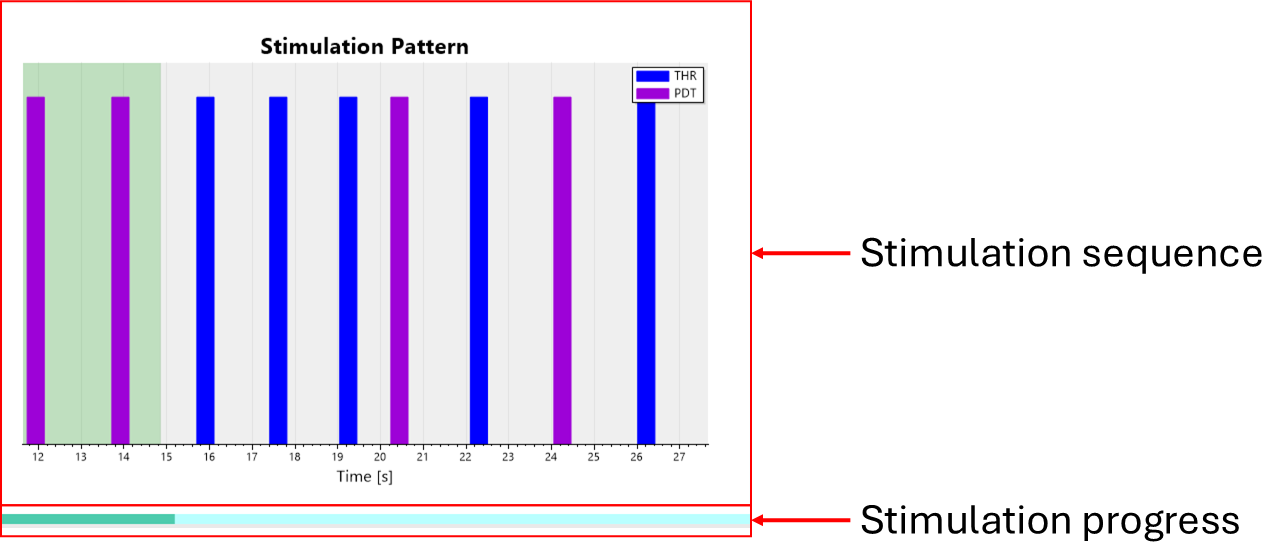
Figure 1: Procedure window for the stimulus sequence procedure.
Procedure definition
A Stimulation Sequences procedure can be defined with the <stimulation-sequence> element within the <procedures> element in the Experiment Definition File (*.expx):
<stimulation-sequence id="T01"
    name="Electrically Evoked Potentials"
    response-collection="ratio-rating"
    stimulus-update-rate="20000"
    trigger-update-rate="20000">

    <stimulation-pattern time-base="seconds">
        <sequence iterations="20">
            <uniformly-distributed-sequence
                maxTperiod="2"
                minTperiod="1"
                iterations="NumberOfStimuli" />
            <sequence Tperiod="10" stimulate="false"/>
        </sequence>
    </stimulation-pattern>

    <stimuli order="block-random">
        <stimulus name="Oddball" intensity="50" count="1">
            <!-- Content omited for brevity -->
        </stimulus>
        <stimulus name="Normal" intensity="20" count="4">
            <!-- Content omited for brevity -->
        </stimulus>
    </stimuli>
</stimulation-sequence>
With the following procedure specific attributes:
| Attribute | Type | Definition |
|---|---|---|
id |
string | Unique identifier of the procedure. |
name |
string | Human-readable name displayed in the UI. |
response-collection |
enum | Enables and configures response collection. |
stimulus-update-rate |
int = Calculated(context) | Update rate (Hz) used by the stimulation engine. |
trigger-update-rate |
int = Calculated(context) | Update rate (Hz) used by the trigger engine. Defaults to stimulus-update-rate if omitted. |
experimental-setup-id |
string | Reference to the experimental setup used for this procedure. |
Definition of stimulation pattern
The <stimulation-pattern> element determines when stimuli are delivered. The pattern generates a
set of time slots, each of which is either filled with stimuli from the <stimuli> set or with a pause.
The stimulation pattern is generated from a composition of two types of sequences:
<sequence>: a sequence with deterministic parameters.<uniformly-distributed-sequence>: a random sequence with an period that is uniformly distrubed between a minimum and maximal period.
The time of a sequence is relative to the starting time of its parent sequence. If a sequence is root, meaning it has no parent, it is relative to time zero.
For calcuated parameters the following variables will be in scope:
NumberOfStimuli: Number of stimuli that will be generated by the<stimuli>element each time a new batch of stimuli is required.
Sequence
Generate a deterministic sequence based on these parameters:
<sequence Tperiod="10" stimulate="false"/>
which has the following attributes:
| Attribute | Type | Definition |
|---|---|---|
iterations |
int = Calculated(context) | Number of repetitions of the sequence. Defaults to 1. |
Tperiod |
double = Calculated(context) | Period between generated time slots. Required for leaf sequences. |
Toffset |
double = Calculated(context) | Offset applied to all generated time slots within the sequence. |
stimulate |
bool | If true, a stimulation slot is generated. |
pause |
bool | If true, a pause is inserted instead of a stimulation slot. |
A <sequence> may contain nested sequences. If child sequences are defined, the parent sequence
acts as a container and its duration is derived from its children unless Tperiod is explicitly specified.
Uniformly distributed sequence
Generate a stochastic sequence where the inter-stimulus interval is uniformly distributed:
<uniformly-distributed-sequence
    minTperiod="1"
    maxTperiod="2"
    iterations="NumberOfStimuli" />
with the following attributes:
| Attribute | Type | Definition |
|---|---|---|
iterations |
int = Calculated(context) | Number of generated time slots. |
minTperiod |
double = Calculated(context) | Minimum period between time slots. |
maxTperiod |
double = Calculated(context) | Maximum period between time slots. |
Toffset |
double = Calculated(context) | Offset applied to generated time slots. |
stimulate |
bool | Generate stimulation slots. |
pause |
bool | Insert pauses instead of stimulation slots. |
For each iteration, the period is sampled as:
Tperiod ~ U(minTperiod, maxTperiod)
Pauses
Pauses are generated when a sequence has pause="true". During execution, the procedure will halt
progression of the stimulation timeline at these time points until it is resumed programmatically
(e.g., via UI interaction or control logic). Pauses that fall outside the generated stimulation
timeline are automatically discarded.
Definition of stimulus set
The <stimuli> element defines the set of stimuli that will populate the stimulation pattern.
<stimuli order="block-random">
    <stimulus name="Oddball" intensity="50" count="1" />
    <stimulus name="Normal" intensity="20" count="4" />
</stimuli>
with the following attributes:
| Attribute | Type | Definition |
|---|---|---|
order |
enum | Defines ordering strategy for generated stimulus batches. |
generator |
string[] = Calculated(context) | Defines stimulus order when order="generated". Must return a sequence of stimulus names. |
Definition of stimuli
Each <stimulus> defines a stimulus prototype that may be instantiated multiple times per batch.
Stimulus attributes:
| Attribute | Type | Definition |
|---|---|---|
name |
string | Identifier used in results, scripting, and logging. |
intensity |
double = Calculated(context) | Value passed to the stimulation and trigger engines. |
count |
int = Calculated(context) | Number of times this stimulus appears in a batch. |
The total number of stimuli in a batch is:
NumberOfStimuli = Σ count
This value is exposed to calculated parameters and is used by the stimulation pattern.
Stimulus ordering
The order attribute controls how batches are generated:
| Value | Definition |
|---|---|
round-robin |
Sequential order as defined in XML. |
random |
Full randomisation across the entire sequence. |
block-random |
Randomised order within each batch. |
latin-squares |
Counterbalanced pseudo-random ordering. |
generated |
Order defined by a Python script. |
For generated, the generator attribute must return a sequence of stimulus names of length
NumberOfStimuli.
Batch generation and allocation
Stimuli are generated in batches of size NumberOfStimuli. Each batch is inserted sequentially into
the stimulation slots. If the total number of stimulation slots is not divisible by the batch size,
remaining slots are not filled.
During execution, the following variables are available:
StimulusName: Name of the currently presented stimulus.BlockNumber: Index of the stimulus within the current batch.
Stimulus content
Each <stimulus> may optionally define:
<stimulus name="Oddball" intensity="50" count="1">
    <triggers>
        <trigger duration="10">
            <code output="trigger-output" />
        </trigger>
    </triggers>
    <stimulus>
        <pulse Is="x" Ts="1" />
    </stimulus>
</stimulus>
<triggers>: Defines trigger output patterns.<stimulus>: Defines the physical or sensory stimulus (e.g., electrical pulse).
If <stimulation-scripts> is defined at the procedure level, stimulus generation may instead be
handled entirely in Python, allowing full control over multimodal stimuli.
Execution model
- The stimulation pattern is generated and converted into time slots.
- The stimulus set generates batches of stimuli.
- Stimuli are assigned to time slots.
- The procedure iterates through time:
- When a time slot is reached, the assigned stimulus is delivered.
- Responses are sampled (if enabled).
- Pauses are enforced when defined.
- The procedure completes when all time slots have been processed.
The temporal resolution of execution is governed by the update rate, which dynamically adapts to the time remaining until the next stimulation event.
Scripting
The results from the stimulation sequence procedure can be accessed from calculated parameters and Python code using dot notation:
ProcedureID.Property
Global result properties
| Property | Type | Description |
|---|---|---|
Completed |
bool |
Indicates whether the procedure completed successfully. |
Failed |
bool |
Indicates whether the procedure failed. |
Duration |
double |
Total duration of the stimulation sequence in milliseconds. |
ResponseCollection |
string |
The response collection mode used during the procedure. |
Stimulation data
Each stimulation sequence produces a list of stimulation events:
ProcedureID.Stimulations
| Property | Type | Description |
|---|---|---|
Stimulations |
Stimulation[] |
List of all stimulation events in temporal order. |
Each stimulation entry contains:
| Field | Type | Description |
|---|---|---|
Stimulus |
string |
Name of the stimulus presented. |
Time |
double |
Time of stimulation (milliseconds from start). |
Intensity |
double |
Intensity of the stimulus. |
Response |
double |
Recorded response value. Returns -1 if no response was recorded. |
ReactionTime |
double |
Reaction time in milliseconds. Returns -1 if no response was recorded. |
Access by stimulus name
Stimulation events grouped by stimulus name can be accessed using the provided methods:
ProcedureID.GetStimulusNames()
ProcedureID.GetStimulation("StimulusName")
| Expression | Type | Description |
|---|---|---|
ProcedureID.GetStimulusNames() |
string[] |
Returns a list of all stimulus names present in the sequence. |
ProcedureID.GetStimulation("Oddball") |
Stimulation[] |
Returns all stimulations where Stimulus == "Oddball". |
If a stimulus name is requested that does not exist in the sequence, an error is raised.
Each returned element has the same fields as described above.
Example usage
# Get all stimulus names
names = ProcedureID.GetStimulusNames()

# Access all stimulations for a specific stimulus
oddballs = ProcedureID.GetStimulation("Oddball")

# Compute mean reaction time for Oddball stimuli
rt = [s.ReactionTime for s in oddballs if s.ReactionTime >= 0]
mean_rt = sum(rt) / len(rt)

# Iterate all stimuli grouped by name
for name in ProcedureID.GetStimulusNames():
    stimulations = ProcedureID.GetStimulation(name)
    print(name, len(stimulations))
Notes
- The order of
Stimulationsreflects the temporal order of presentation. - Missing responses are represented by
-1. - Reaction times are only available when response collection is enabled.
- Stimulus names are case-sensitive when accessed via dictionary or dot notation.