Threshold Estimation
The threshold estimation test uses adaptive methods to efficiently estimate a participant’s perceptual threshold or full psychometric function. Instead of presenting a fixed set of stimulus intensities, adaptive methods adjust stimulus levels in real time based on the participant’s responses. Adaptive methods allow the experimenter to concentrate trials around the most informative stimulus range—typically near the participant’s threshold—thereby reducing the total number of trials needed compared to non-adaptive (e.g., method of constant stimuli) approaches.
The purpose of the <psychophysics-threshold-estimation> procedure is to estimate the psychometric function or threshold for a given stimulus modality with adaptive methods. These adaptive methods estimate the psychometric function or threshold based on whether or not the subject performed a response task correctly (result: True) or incorrectly (result: False).
Consequently, the algorithm performs the estimation iteratively:
- The stimulus is presented to the subject according to the response task. The subject answers a question about the stimulus, with the answer being either correct or incorrect.
- The result of the response task is fed into the algorithm, which updates the estimate and, based on the response and algorithm state, selects the next stimulus intensity to be tested.
- This loop continues until the adaptive algorithm’s stop criterion is met.
The procedure window for the <psychophysics-threshold-estimation> is shown in Figure 1. It consists of three areas: 1) recorded responses, 2) psychometric function, and 3) manual response task.
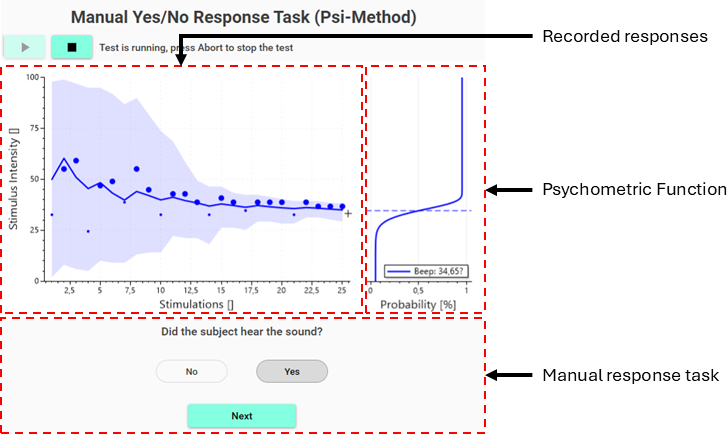
Figure 1: Procedure window of the threshold estimation procedure
The recorded responses area is always shown and shows information about the tested stimulation intensities and subject responses. The psychometric function area is always shown and will show information on either the estimated psychometric functions or thresholds. The manual response task area is shown only when a manual response task is used and provides the operator with guidance on what to ask the participant, and allows the operator to enter the participant’s response to the estimation algorithm.
Procedure definition
A threshold estimation procedure can be defined with the <psychophysics-threshold-estimation> element within the <procedures> element in the Experiment Definition File (*.expx):
<psychophysics-threshold-estimation id="yesNo"
    name="Yes/No Response Task"
    experimental-setup-id="image"
    stimulus-update-rate="44100">

    <update-rate-deterministic value="2000" />

    <yes-no-task />

    <channels>
        <channel id="CH01" name="Beep">
            <up-down-method
                start-intensity="Stimulator.Range/2 + Stimulator.Imin"
                initial-direction="decreasing"
                reversal-rule="1"
                skip-rule="1"
                stop-rule="7"
                step-size="0.15"
                max-step-size-reduction="0.25"
                step-size-reduction="0.5" />

            <stimulus>
                <sine Is="x" Ts="200" Frequency="1000" />
            </stimulus>
        </channel>
    </channels>
</psychophysics-threshold-estimation>
Listing 1: Definition of a psychophysical threshold estimation procedure
The <psychophysics-threshold-estimation> procedure has these procedure specific attributes:
| Attribute | Type | Specification |
|---|---|---|
stimulus-update-rate |
int = Calculated(tc) | Update rate in Hz for stimulus generation. Defines how often the stimulus waveform is evaluated and sent to the output. |
trigger-update-rate |
int = Calculated(tc) | Update rate in Hz for trigger generation. Defines how often trigger states are evaluated and updated. |
The <psychophysics-threshold-estimation> procedure has the following specific elements:
| Element | Specification |
|---|---|
<update-rate-deterministic>, or update-rate-random |
The inter-stimulus interval is the time between when stimuli and /or questions are presented to the subject. This element is only required for automatic response tasks. |
<configuration> |
Trigger configuration for the generation of stimuli and triggers. |
<manual-yes-no-task>, <yes-no-task>, <forced-yes-no-task>, <manual-interval-rating-task>, <interval-rating-task>, <manual-categorical-rating-task>, <categorical-rating-task>, <ratio-rating-task>, <interval-forced-choice-task>, or <alternative-forced-choice-task> |
Selection and configuration of the response task used for determining the psychometric performance of the subject, meaning whether they were able to perceive the stimulus or not. A wide selection of response tasks is available, encompassing both tasks in which the subject’s response is sampled automatically or entered manually by the operator, threshold and supra-threshold perception tasks, and yes/no or forced-choice tasks. Please see the Response tasks section for a detailed description of each task and how to configure them. |
<stimulation-scripts> |
The test uses a Stimulator instrument to deliver stimuli to the participants and a TriggerGenerator instrument to generate triggers to external equipment. This Consequently, this element can be used to extend the test with stimulus modalities or triggers that are not natively supported by the test. |
<channels> |
Stimulus channels are a set of stimuli for which their psychometric function and/or thresholds are estimated concurrently. Each stimulus channel consists of a stimulus definition and an adaptive estimation algorithm. When the test runs, it will alternate between each of these stimuli until the stop criteria for all stimuli are met. Consequently, the psychometric functions will be estimated concurrently, without the participant knowing which stimulus is being delivered. All stimulus channels will use the same response task, as the instructions for the participant must be the same regardless of which stimulus is being delivered. |
Adaptive methods
Up/Down
The up/down method (also known as a staircase procedure) is one of the most widely used adaptive methods in psychophysics for estimating perceptual thresholds. The method dynamically adjusts stimulus intensity based on the participant’s responses, focusing trials on the threshold region where responses transition from mostly incorrect to mostly correct.
The up/down method operates on the following principle:
- Correct response → decrease stimulus intensity
- Incorrect response → increase stimulus intensity
By repeatedly applying this rule, the stimulus intensity oscillates around the participant’s threshold, producing a sequence of reversals that can be used to estimate the threshold value. The Up/Down method is illustrated in Figure 2.
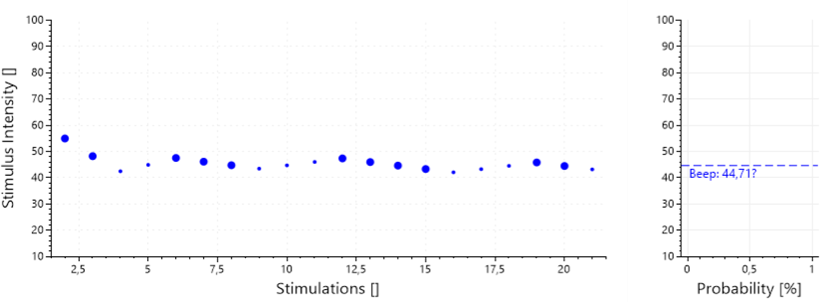
Figure 2:
Reversals and Threshold Estimation
A reversal is defined as a change in the direction of stimulus adjustment. For example:
- Incorrect → Correct (intensity switches from increasing to decreasing)
- Correct → Incorrect (intensity switches from decreasing to increasing)
After an initial transient phase, the stimulus values at reversal points cluster around the participant’s threshold. The threshold estimate is typically computed as: The mean of the reversal intensities, excluding a configurable number of initial reversals (the skip rule)
Step Size and Step Size Reduction
The step size determines how much the stimulus intensity changes after each response. Larger step sizes allow rapid convergence toward the threshold early in the procedure, while smaller step sizes improve precision near the threshold.
LabBench supports adaptive step size reduction, where: The step size is multiplied by a reduction factor after each reversal. A lower bound (max-step-size-reduction) prevents the step size from becoming too small. This strategy combines fast convergence with stable threshold estimation. If adaptive step size reduction is used the threshold average will be weighted with the inverse of the step sizes at the reversals.
Definition of the method
A stimulus channel <channel> can be configured to use the Up/Down estimation method with the <up-down-method> element:
<up-down-method
    start-intensity="Stimulator.Range/2 + Stimulator.Imin"
    initial-direction="decreasing"
    reversal-rule="1"
    skip-rule="1"
    stop-rule="7"
    step-size="0.15"
    max-step-size-reduction="0.25"
    step-size-reduction="0.5" />
Listing 2: Definition of the Up/Down method
The method is configured with the following attributes:
| Attribute | Type | Specification |
|---|---|---|
start-intensity |
double = Calculated(tc) | Initial intensity for the algorithm. |
initial-direction |
enum | Initial direction for the intensity change. |
reversal-rule |
int = Calculated(tc) | The number of times the participants must either succeed or fail for the intensity change to change direction. This attribute is used for both upward and downward directions unless either the up-rule or the down-rule is defined, respectively. The default value for this attribute is one (1). |
up-rule |
int = Calculated(tc) | The number of times the participants must succeed when the intensity is increased upward for the intensity change to change direction. The default value for this attribute is one (1). |
down-rule |
int = Calculated(tc) | The number of times the participants must fail when the intensity is decreased upward for the intensity change to change direction. The default value for this attribute is one (1). |
step-size |
double = Calculated(tc) | Will be used as the initial step size in both the up and down directions, unless the step-size-up or step-size-down is defined. Default value is 0.1. |
step-size-up |
double = Calculated(tc) | Will be used as the initial step size in the upward direction. If it is undefined, the step-size attribute will be used instead as the initial step size for the up direction. |
step-size-down |
double = Calculated(tc) | Will be used as the initial step size in the downward direction. If it is undefined, the step-size attribute will be used instead as the initial step size for the downward direction. |
step-size-reduction |
double = Calculated(tc) | Used to configure adaptive step sizes. The step size after a reversal will be new-step-size = (1 - step-size-reduction) * old-step-size. The default value is 0.5. |
max-step-size-reduction |
double = Calculated(tc) | The maximum by which step sizes will be reduced when adaptive step sizes are enabled by setting the step-size-reduction attribute to a non-zero value. |
step-size-type |
enum | Type of step size: absolute, the step size is added or subtracted to the current intensity, or relative, the step size is relative to the current intensity. |
Please note not all of these attributes are shown in the code example above.
Discrete Up/Down
The discrete up/down method is a variant of the classical staircase procedure in which stimulus intensity is restricted to a finite, predefined set of discrete values. Instead of continuously adjusting the stimulus intensity by adding or subtracting a step size, the algorithm moves up or down within a list of allowed intensity levels. Conceptually, the discrete up/down method follows the same adaptive logic as the continuous version, but replaces arithmetic intensity updates with index-based transitions between predefined intensity levels. The Up/Down method is illustrated in Figure 3.
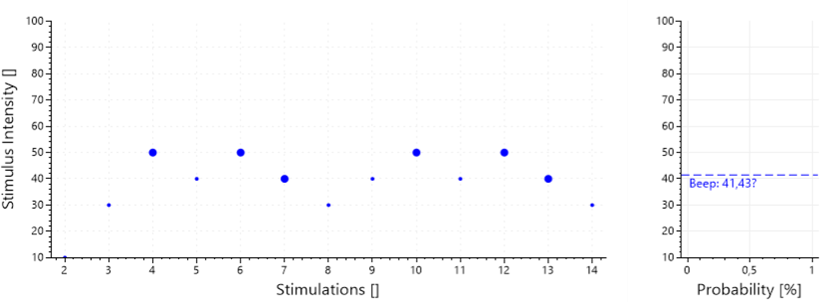
Figure 3:
Unlike the continuous up/down method, the step size in the discrete variant is defined in terms of index jumps within the intensity list. Reversals are detected when the direction of index movement changes. After discarding a configurable number of initial reversals (the skip rule), the remaining reversal intensities are used to estimate the threshold. The threshold is computed as the mean of the intensities at the reversal points
Definition of the method
A stimulus channel <channel> can be configured to use the Up/Down estimation method with the <discrete-up-down-method> element:
<discrete-up-down-method
    stop-rule="7"
    initial-intensity="10"
    initial-step-size="2"
    initial-direction="increasing"
    skip-rule="1"
    intensities="[10, 20, 30, 40, 50, 60, 70, 80, 90, 100]" />
Listing 3: Definition of the Discrete Up/Down method
The method is configured with the following attributes:
| Attribute | Type | Specification |
|---|---|---|
initial-intensity |
double = Calculated(tc) | This attribute is used to select the initial intensity from the set of allowed intensities (‘intensities’). The initial intensity will be selected as the intensity in the set of allowed intensities closest to the value of this initial intensity attribute. If this attribute is not defined, the initial intensity will be set based on the initial direction. If the initial direction is upward, the smallest allowed intensity will be used; otherwise, the largest allowed intensity will be used. |
initial-direction |
enum | Initial direction for the intensity change. |
initial-step-size |
int = Calculated(tc) | Sets the initial step size. The initial step size can be set to a value larger than one (1) to initially rapidly approach the threshold. Once a reversal has occurred, the step size will be set to one (1). |
stop-rule |
int = Calculated(tc) | Number of reversals required before the algorithm is completed. |
skip-rule |
int = Calculated(tc) | The number of initial reversals that are skipped when calculating the threshold as the average of the intensity at the reversals. Consequently, if this skip-role attribute is set to one (3) and the stop-rule is set to nine (9), the threshold will be calculated from the last six (6) reversals. The default value is zero (0). |
intensities |
double[] = Calculated(tc) | The discrete set of allowed stimulus intensities in the form of an array of doubles. These values must be ordered from the smallest to the largest and must be within the bounds of the Imin and Imax attributes for the stimulus channel. |
Psi-Method
The Psi method is a Bayesian adaptive procedure for efficiently estimating the parameters of a psychometric function. Unlike staircase methods, which primarily converge to a single threshold value, the Psi method explicitly models the entire psychometric function and selects stimulus intensities that maximize expected information gain on each trial. At each iteration, the Psi method evaluates the expected posterior entropy for all candidate stimulus intensities and selects the one that minimizes this entropy, thereby maximizing the expected reduction in uncertainty about the psychometric parameters.
This process is repeated until the predefined number of trials is reached. This method is illustrated in figure 4.
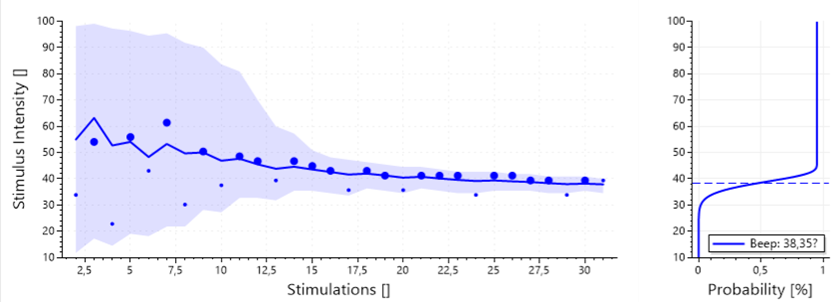
Figure 4:
Stimulus Intensity Normalization in the Psi Method
In the Psi method, stimulus intensities are normalized to the unit interval [0,1]. This normalization applies both to the candidate stimulus intensities considered by the algorithm and to the threshold parameter (𝛼) of the psychometric function. Normalization is a conceptual and computational step that separates the estimation logic of the Psi method from the physical units of the stimulus.
The normalized intensity x ∈ [0,1] is mapped to a physical stimulus intensity (Istimulus) internally using the stimulus channel’s minimum and maximum intensities:
Istimulus = (Imax - Imin) * x + Imin
This mapping is performed automatically by LabBench and is transparent to the user once the stimulus range is defined. Intensity normalization significantly simplifies experiment design and reduces configuration errors.
Channel definition
A stimulus channel <channel> can be configured to use the Psi estimation method with the <psi-method> element:
<psi-method number-of-trials="30">
    <quick lambda="0.05" gamma="0.33" />
    <beta type="linspace" x0="-1.2" x1="1.2" n="24"/>
    <alpha type="linspace" x0="0" x1="1" n="100" />
    <intensity type="linspace" x0="0" x1="1" n="50" />
</psi-method>
Listing 4: Definition of the Psi method
The method is configured with the following attributes:
| Attribute | Type | Specification |
|---|---|---|
number-of-trials |
int = Calculated(tc) | Number of trials that are performed with the algorithm. |
The method is configured with the following elements:
| Element | Specification |
|---|---|
<quick> |
The psychometric function that links stimulus intensity to the probability of a correct or “yes” response, providing a quantitative model of perceptual sensitivity. Only the guess rate (gamma) and lapse Rate (lambda) are used, if alpha and beta are specified they are ignored. The guess rate (gamma/γ) specifies the probability of a correct response in the absence of any usable stimulus information. It defines the lower asymptote of the psychometric function. The lapse rate (lambda/λ) models stimulus-independent errors that occur even at high stimulus intensities. |
<beta> |
The During the adaptive procedure, the Psi method updates a posterior distribution over these slope values, allowing it to jointly estimate response sensitivity (threshold) and response consistency (slope) rather than assuming a fixed steepness of the psychometric function. |
<alpha> |
The During the experiment, the Psi method maintains and updates a posterior probability distribution over these candidate values, and final threshold estimates are derived from this posterior. |
<intensity> |
The For each trial, the Psi algorithm evaluates all candidate intensities in this grid and selects the one expected to provide the greatest reduction in uncertainty about the psychometric parameters, ensuring efficient and principled stimulus selection throughout the experiment. |
Response tasks
Each iteration of the adaptive method for estimating thresholds or psychometric functions requires an outcome from a response task, which, for all tasks, is either true (they performed the response task correctly) or false (they failed the response task). The response task is chosen based on several factors, such as the nature of the stimulus, the need to reduce response bias, and the requirements for speed and simplicity.
LabBench includes several built-in response tasks that can be configured and used with the threshold estimation test. These response tasks are divided into two categories: 1) automatic, the participant’s response is collected automatically without requiring the involvement of the operator, and 2) manual, the operator needs to ask the subject and enter the response manually into LabBench. LabBench has the following built-in response tasks:
| Task | Type | Description | Required Instruments |
|---|---|---|---|
| Yes/No | Automatic | In a Yes/No response task, the subject is asked to press the button each time a stimulus is felt. This response is timed, meaning that if the subject does not press the button before the next stimulus is given, then it will be assumed that the stimulus was not felt. | Button |
| Manual Yes/No | Manual | In a Manual Yes/No response task, the experimenter asks the subject after each stimulation whether they felt the stimulus. This response is then entered into the algorithm manually by the experimenter. Consequently, the test will wait indefinitely until the subject has answered the experimenter. | None |
| Interval Forced Choice | Automatic | Configuration of a stimulus interval. Stimuli will be generated for each stimulus interval in the order they are defined; when the stimulus is generated, the cue for that stimulus interval will be shown to the subject. For each trial, one stimulus interval will be randomly selected as the one in which the stimulus is to be present. For that interval, the stimulus intensity (x) will be set to the current intensity determined by the estimation algorithm; for all other intervals, the stimulus intensity (x) will be set to Imin for the stimulus channel. For calculated parameters, the currently active stimulus interval and selected stimulus interval are also available as the StimulusInterval and SelectedStimulusInterval parameters, respectively. These parameters contain the stimulus interval IDs. |
Button, ImageDisplay |
| Alternatives Forced Choice | Automatic | Configuration of a stimulus alternative where each is a different variant of the stimulus. For example, in a test that determines the just noticeable difference between three audible tones, there will be three different stimulus alternatives, for which either the first, middle, or last tone will be of a different intensity than the other tones. For each trial, one stimulus alternative will be selected at random and presented to the subject. The selected one is available to calculated parameters in the StimulusAlternative parameter, whose value is the id attribute of the selected stimulus alternative. |
Button, ImageDisplay |
| Ratio Rating | Automatic | In the Ratio Rating Task, the subject is asked to rate the stimuli’s sensations on a ratio rating scale/visual analog scale. If the subject rate exceeds the target, the response task is successful and returns True; otherwise, it returns False. | RatioScale |
| Interval Rating | Automatic | In the Interval Rating Task, the subject is asked to rate the stimuli’s sensations on an interval rating scale. If the subject rate exceeds the target, the response task is successful and returns True; otherwise, it returns False. | IntervalScale |
| Manual Interval Rating | Manual | In the Manual Interval Rating Task, the subject is asked to rate the stimuli’s sensations on an interval rating scale by the experimenter. The subject provides this rating verbally, which the experimenter then manually enters into the algorithm. The response task will wait indefinitely until the experimenter has entered the subject’s rating into the algorithm. If the subject rate exceeds the target, the response task is successful and returns True; otherwise, it returns False. | None |
| Categorical Rating | Automatic | In the Categorial Rating Task, the subject is asked to rate the stimuli’s sensations on a categorial rating scale. If the subject rate exceeds the target, the response task is successful and returns True; otherwise, it returns False. | OrdinalScale |
| Manual Categorical Rating | Manual | In the Manual Categorial Rating Task, the subject is asked to rate the stimuli’s sensations on a categorial rating scale by the experimenter. The subject provides this rating verbally, which the experimenter then manually enters into the algorithm. The response task will wait indefinitely until the experimenter has entered the subject’s rating into the algorithm. If the subject rate exceeds the target, the response task is successful and returns True; otherwise, it returns False. | None |
Yes/No
The Yes/No response task is the most straightforward response task available in LabBench and is commonly used for basic detection experiments. In this task, a stimulus is presented to the subject, followed by a predefined response interval during which the subject may indicate perception of the stimulus by pressing a button. If the subject presses the button within this interval, the response task returns True, indicating that the stimulus was perceived. If no button press is detected before the response window closes, the task returns False, indicating that the stimulus was not perceived.
The instruction given to the subject is therefore straightforward: If you can feel the stimulus, press the button. Because the response is time-limited and binary, this task is well-suited for adaptive threshold estimation procedures and automated experiments with minimal operator involvement.
A key limitation of the Yes/No response task is that it is prone to response bias. Because the subject decides internally whether a stimulus was present or not, their responses can be influenced by non-sensory factors such as expectation, motivation, risk tolerance, or misunderstanding of instructions. In a Yes/No task, these biases directly affect the measured detection rate and can shift the estimated threshold independently of actual sensory sensitivity. The task therefore conflates perceptual sensitivity with decision criteria.
Task definition
A threshold estimation test <threshold-estimation-test> can be configured to use the Yes/No response task with the <yes-no-task> element:
<yes-no-task />
This element has no attributes or child elements.
Required instruments
When used a Button instrument must be defined in the experimental setup and assigned to the test. A press on any button configured to button-01 will be interpreted by the response task as a positive response by the subject. Below is an example of how a Joystick can be configured to be used by a Yes/No response task:
<joystick id="joystick">
    <map experimental-setup-id="image">
        <button-assignment code="16" button="button-01" label="Button 1"/>
        <button-assignment code="32" button="button-01" label="Button 2"/>
    </map>
</joystick>
It must then be assigned to the test in the <device-mapping> element of the experimental setup. Below is an example of the simplest device assignment, which will assign this Joystick to all tests that requires a Button instrument in the protocol including Threshold Estimation Tests:
<device-assignment device-id="joystick" instrument-name="Button" />
Manual Yes/No
The Manual Yes/No response task is a manual variant of the standard Yes/No detection task and is conceptually identical in the decision made by the subject. A stimulus is presented, after which the operator verbally asks the subject a Yes/No question (e.g., “Did you feel the stimulus?”). The subject responds verbally, and the operator then enters the response manually into LabBench, which returns True for Yes (stimulus perceived) or False for No (stimulus not perceived).
How the operator is required to enter the response of the subject is shown in Figure 5.
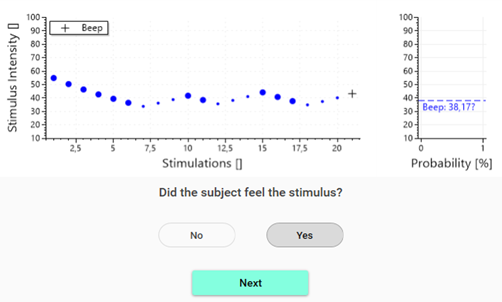
Figure 5:
Unlike the automatic Yes/No task, the manual version does not impose a response time window. The test will wait indefinitely until the operator records the subject’s response. This lack of a response time window removes time pressure on the subject. It makes the task suitable for populations that may have slower reaction times, difficulty using response devices, or require additional time to consider their response.
Removing the response time constraint has important implications for both response bias and lapse rate. Because the subject is not required to respond within a fixed interval, the likelihood of missed responses due to delayed motor execution is reduced. This lack of response time constraint typically leads to a lower effective lapse rate, particularly in participants with variable reaction times or reduced motor control.
However, like all Yes/No paradigms, the manual task remains susceptible to response bias. The subject still applies an internal decision criterion when answering the question, and this criterion may be influenced by expectation, confidence, or interaction with the operator. In some cases, the absence of time pressure may encourage more deliberation, thereby increasing response bias.
Task definition
A threshold estimation test <threshold-estimation-test> can be configured to use the Manual Yes/No response task with the <manual-yes-no-task> element:
<manual-yes-no-task instruction="Did the subject feel the stimulus?" />
This element has the following attributes.
| Attribute | Type | Specification |
|---|---|---|
instruction |
string | Question that the experimenter must ask the subject that the subject must answer with either a Yes or No response. |
As a manual task the task requires no instruments.
Interval Forced Choice
The Interval Forced Choice (IFC) response task is a bias-reduced detection paradigm in which the stimulus is presented within one of several predefined temporal intervals, and the participant is required to indicate which interval it occurred in. Rather than deciding whether a stimulus was present or absent, the subject must always make a choice, even when unsure.
In an IFC task, a sequence of interval cues is presented to the subject. A visual cue signals each interval, and the stimulus is delivered randomly exactly once in one of these intervals. After all intervals have been presented, a probe screen is shown that instructs the subject how to respond and provides the available response options. The subject then selects the interval in which they believe the stimulus was presented. The response task returns True if the selected interval matches the interval in which the stimulus was actually delivered, and False otherwise. This task is illustrated in Figure 7.
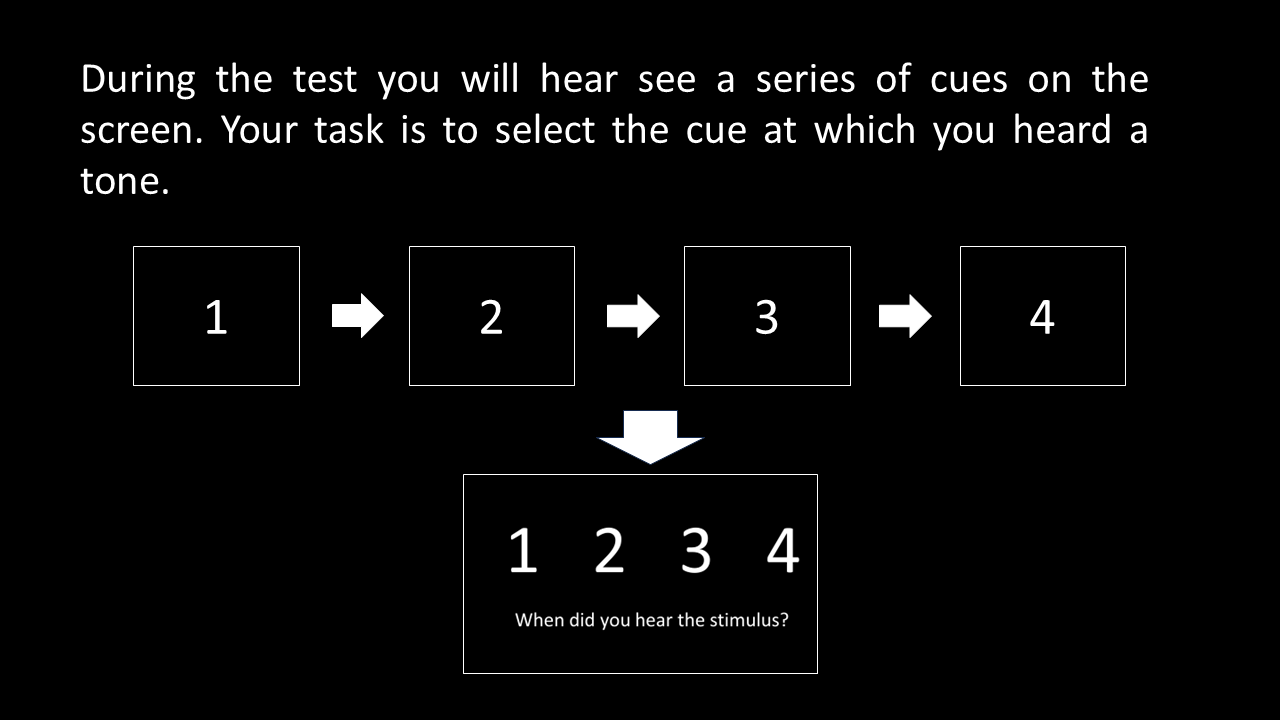
Figure 7:
In an interval forced-choice task with 𝑁 intervals, chance performance is 1/𝑁. If the subject cannot perceive the stimulus, their response is assumed to be random across intervals. For example, in a four-interval forced choice (4IFC) task, the probability of a correct response by chance alone is 25%. This known chance level (gamma) allows performance to be interpreted directly in terms of perceptual sensitivity and provides a natural lower bound for the psychometric function.
A significant advantage of the IFC task is that it strongly reduces response bias. Because the subject must choose one of the presented intervals on every trial, there is no explicit “yes” or “no” decision and no opportunity to adopt a liberal or conservative response criterion, meaning;
- A liberal response bias leads the subject to press the button whenever they are uncertain, increasing false positives.
- A conservative response bias leads the subject to respond only when they are very certain, increasing false negatives.
The subject’s internal decision criterion primarily affects which interval is chosen, not whether a response is made.
Task definition
A threshold estimation test <threshold-estimation-test> can be configured to use the Interval Forced Choice response task with the <interval-forced-choice-task > element:
<interval-forced-choice-task
    probe="Images.ProbeIFC"
    display-duration="750"
    display-interval="1000"
    pause="1000">

    <interval id="A" image="Images.Cue01" button="button-01" />
    <interval id="B" image="Images.Cue02" button="button-02" />
    <interval id="C" image="Images.Cue03" button="button-03" />
    <interval id="D" image="Images.Cue04" button="button-04" />
</interval-forced-choice-task>
This element has the following attributes.
| Attribute | Type | Specification |
|---|---|---|
probe |
Image = Calculated(tc) | Image that will be used to probe the subject for an answer to which stimulus interval the stimulus was presented when the cue was shown. |
display-duration |
int | The duration in milliseconds that the cue will be displayed to the subject. |
display-interval |
int | The duration in milliseconds between the display of cues or the prompt. The display-interval value must be greater than the display-duration value. |
pause |
int | The delay in milliseconds between when the subject answered the question and the next stimulus is presented. |
Where each child <interval> element defines a stimulus interval with the following attributes:
| Attribute | Type | Specification |
|---|---|---|
id |
string | ID of the stimulus interval. |
image |
Image = Calculated(tc) | Cue to be shown to subject in the stimulus interval. |
button |
enum | Button that the subject will use to indicate that the stimulus was present in the stimulus interval. |
The stimuli must be generated so it is only delivered in the selected stimulus interval. For all but the selected stimulus interval the intensity x will be zero, meaning stimuli can usually be defined without any special consideration to it being used for a Forced Choice Interval task. For example, stimulus for the example above is defined as:
<stimulus>
    <sine
        Is="x"
        Ts="750"
        Tdelay="0"
        Frequency="1000" />
</stimulus>
However, if the stimulus must be generated with consideration to whether or not it is being generated for the selected stimulus interval, the id of the selected stimulus interval and currently active stimulus interval is available. The currently active stimulus interval and selected stimulus interval are available as the StimulusInterval and SelectedStimulusInterval parameters, respectively. These parameters contain the stimulus interval IDs.
Required instruments
When used Button and ImageDisplay instruments must be defined in the experimental setup and assigned to the test. The buttons for all intervals must be defined in the button <map> for the Button instrument.
<joystick id="joystick">
    <map experimental-setup-id="image">
        <button-assignment code="1" button="button-01" label="Button 1"/>
        <button-assignment code="2" button="button-02" label="Button 2"/>
        <button-assignment code="4" button="button-04" label="Button 4"/>
        <button-assignment code="8" button="button-03" label="Button 3"/>
    </map>
</joystick>
These instruments must then be assigned to the test in the <device-mapping> element of the experimental setup. Below is an example of the simplest device assignment, which will assign this Joystick and ImageDisplay to all tests that requires a Button and ImageDisplay instruments in the protocol including Threshold Estimation Tests:
<device-assignment device-id="joystick" instrument-name="Button" />
<device-assignment device-id="display.image" instrument-name="ImageDisplay" />
Alternatives Forced Choice
The Alternatives Forced Choice (AFC) response task is a bias-reduced psychophysical paradigm in which the participant must identify which of several possible stimulus alternatives was presented on each trial. Unlike interval-based forced choice tasks, the AFC task varies a stimulus property (e.g., frequency, spatial location, orientation, or pattern) rather than the timing of the stimulus.
In each trial, one stimulus alternative is randomly selected from a predefined set and presented to the participant, along with a corresponding visual cue. This cue informs the participant that a stimulus is being presented, but not which alternative is active. After stimulus presentation, a probe screen is shown that instructs the participant how to respond and presents the available response options. The participant must then select the alternative they believe was delivered. The response task returns True if the selected alternative matches the delivered stimulus alternative, and False otherwise. This task is illustrated in Figure 8.
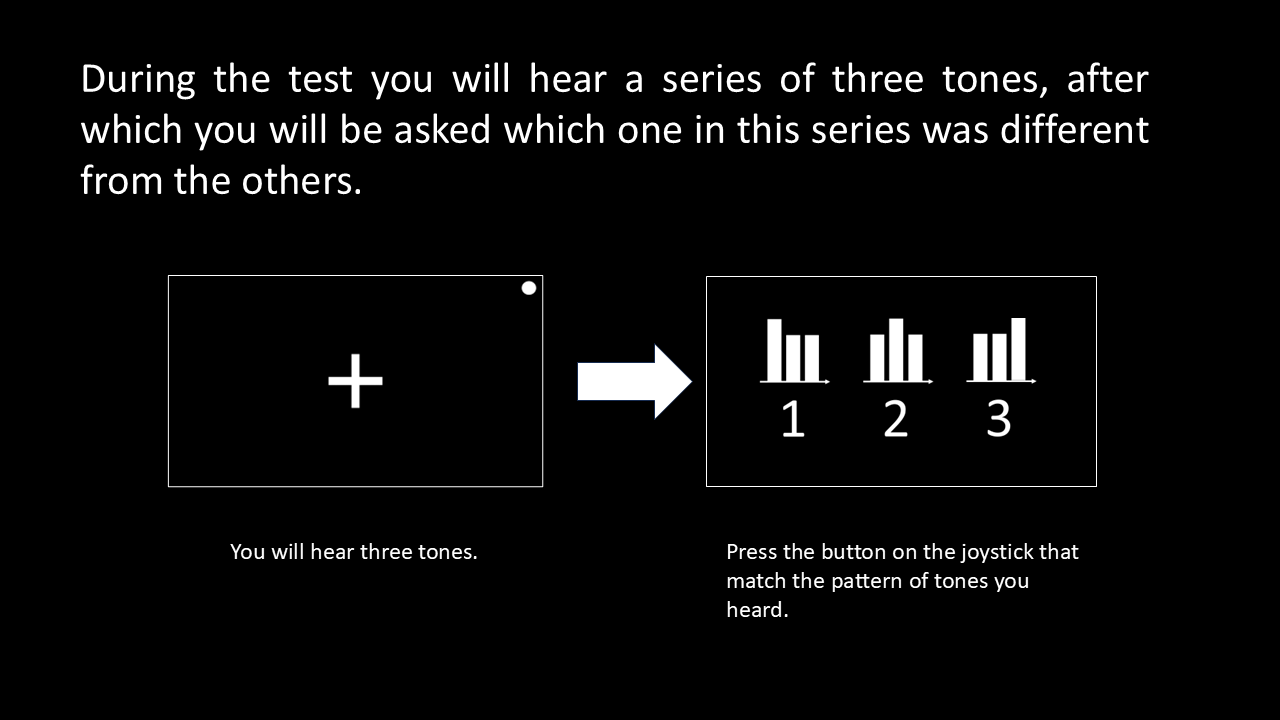
Figure 8:
In an AFC task with 𝑁 alternatives, chance performance is 1/𝑁. If the participant cannot reliably perceive the stimulus property that distinguishes the alternatives, their response is assumed to be random. For example, in a three-alternative forced choice (3AFC) task, the probability of a correct response by chance is approximately 33%. As stimulus intensity increases and the distinguishing feature becomes perceptually salient, the participant’s probability of selecting the correct alternative increases accordingly.
A significant strength of the AFC task is its strong resistance to response bias. Because the participant must always choose one of the alternatives, there is no subjective decision about whether a stimulus was present or absent. Instead, the task forces a comparative judgment between alternatives, which substantially reduces criterion-based biases such as conservative or liberal responding. As a result, AFC tasks provide threshold estimates that more closely reflect true sensory sensitivity rather than decision strategy.
Task definition
A threshold estimation test <threshold-estimation-test> can be configured to use the Alternatives Forced Choice response task with the <alternative-forced-choice-task> element:
<alternative-forced-choice-task
    probe="Images.ProbeAFC"
    cue="Images.CueAFC"
    display-duration="2000"
    display-interval="3000"
    pause="1000">

    <alternative id="A" button="button-01" />
    <alternative id="B" button="button-02" />
    <alternative id="C" button="button-03" />
</alternative-forced-choice-task>
This element has the following attributes.
| Attribute | Type | Specification |
|---|---|---|
probe |
Image = Calculated(tc) | Image that will be used to probe the subject for an answer to which stimulus alternative was presented when the cue was shown. |
cue |
Image = Calculated(tc) | Image that will be used to cue the subject to pay attention to the stimulus. |
display-duration |
int | The duration in milliseconds that the cue will be displayed to the subject. |
display-interval |
int | The duration in milliseconds between the display of the cue and the display of the prompt. The display-interval value must be greater than the display-duration value. |
pause |
int | The delay in milliseconds between when the subject answered the question and the next stimulus is presented. |
each child <alternative> element defines a stimulus alternative with the following attributes:
| Attribute | Type | Specification |
|---|---|---|
id |
string | Unique ID of the stimulus alternative. |
button |
enum | Button that the subject will use to indicate if they felt this specific stimulus alternative. |
The stimuli must be generated so that the selected stimulus alternative will be generated. The ID of the selected stimulus alternative is available in the StimulusAlternative variable, which can be used to generate parameters and stimuli using Python scripts. The stimulus definition below demonstrates how the StimulusAlternative variable is used to generate the three-tone stimulus alternatives used in the task example above.
<stimulus>
    <combined>
        <sine
            Is="50 + x if StimulusAlternative == 'A' else 50"
            Ts="500"
            Tdelay="0"
            Frequency="1000" />
        <sine
            Is="50 + x if StimulusAlternative == 'B' else 50"
            Ts="500"
            Tdelay="1000"
            Frequency="1000" />
        <sine
            Is="50 + x if StimulusAlternative == 'C' else 50"
            Ts="500"
            Tdelay="2000"
            Frequency="1000" />
    </combined>
</stimulus>
Required instruments
When used Button and ImageDisplay instruments must be defined in the experimental setup and assigned to the test. The buttons for all intervals must be defined in the button <map> for the Button instrument.
<joystick id="joystick">
    <map experimental-setup-id="image">
        <button-assignment code="1" button="button-01" label="Button 1"/>
        <button-assignment code="2" button="button-02" label="Button 2"/>
        <button-assignment code="8" button="button-03" label="Button 3"/>
    </map>
</joystick>
These instruments must then be assigned to the test in the <device-mapping> element of the experimental setup. Below is an example of the simplest device assignment, which will assign this Joystick and ImageDisplay to all tests that requires a Button and ImageDisplay instruments in the protocol including Threshold Estimation Tests:
<device-assignment device-id="joystick" instrument-name="Button" />
<device-assignment device-id="display.image" instrument-name="ImageDisplay" />
Ratio Rating
The Ratio Rating response task is a psychophysical paradigm used to estimate the stimulus intensity required to elicit a specified supra-threshold perceptual response, rather than the minimum intensity required for detection. In this task, the subject rates the perceived magnitude of a stimulus using a ratio rating scale (i.e., a visual analog scale with ratio properties), and the response is evaluated relative to a predefined target value.
For each trial, a stimulus is presented, and the subject provides a rating of its perceived intensity. If the reported rating meets or exceeds the target value, the response task returns True; otherwise, it returns False. The target, therefore, defines a criterion level of perceived magnitude, and the adaptive estimation algorithm adjusts stimulus intensity to find the level required to exceed this criterion reliably.
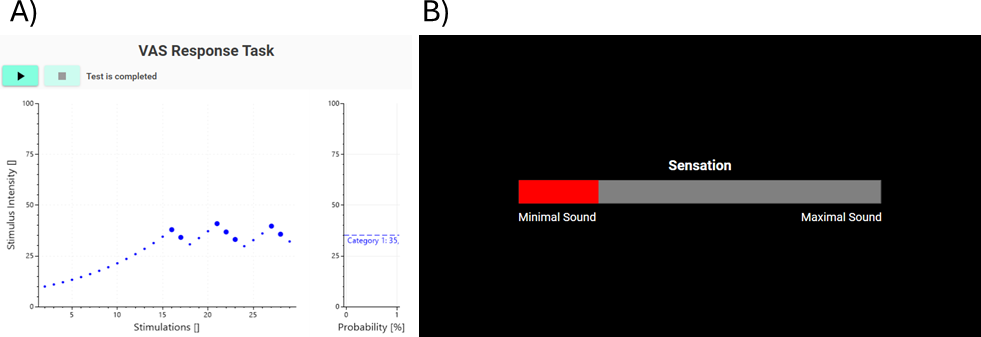
Figure 9:
It is essential to distinguish between perception thresholds and supra-threshold perception response thresholds:
- A perception threshold is the minimum stimulus intensity that can be reliably detected, typically corresponding to a low probability of correct detection (e.g., 50–75%).
- A supra-maximal threshold, as estimated by the ratio rating task, refers to the stimulus intensity required to evoke a specified magnitude of sensation, well above the detection limit.
In other words, perception thresholds answer the question “Can the stimulus be detected?”, whereas supra-maximal thresholds answer “How strong must the stimulus be to feel like this much?”
Task definition
A threshold estimation test <threshold-estimation-test> can be configured to use the Interval Forced Choice response task with the <interval-forced-choice-task > element:
<ratio-rating-task target="2"/>
This element has the following attributes.
| Attribute | Type | Specification |
|---|---|---|
target |
double = Calculated(tc) | Target rating for the response task |
Required instruments
When used a RatioScale instrument must be defined in the experimental setup and assigned to the test.
<display id="display"
    screen="secondary"
    position="fullscreen"
    normative-distance="40">

    <configurations>
        <visual-analog-scale id="vas"
            experimental-setup-id="vas"
            controller-device="joystick"
            length="10">
            <anchors>
                <top-anchor text="Maximal Sound" />
                <bottom-anchor text="Minimal Sound" />
            </anchors>
        </visual-analog-scale>
    </configurations>
</display>
These instruments must then be assigned to the test in the <device-mapping> element of the experimental setup, an example of such a device assignment is shown below:
<device-assignment
    device-id="display.vas"
    test-type="psychophysics-threshold-estimation"
    test-id="VAS"
    instrument-name="RatioScale" />
Interval Rating
The Interval Rating response task is a psychophysical paradigm used to estimate the stimulus intensity required to elicit a specified perceptual rating on a numerical (interval) rating scale. Like the Ratio Rating task, it is designed to find a supra-threshold criterion, rather than a detection threshold, by determining the stimulus intensity at which the participant’s reported sensation reliably reaches or exceeds a predefined target value.
In each trial, a stimulus is presented, and the participant rates the perceived intensity using a numerical rating scale with evenly spaced categories (e.g., 0–10). If the reported rating meets or exceeds the target value, the response task returns True; otherwise, it returns False. The adaptive estimation algorithm then adjusts stimulus intensity to converge on the level required to exceed the target criterion.
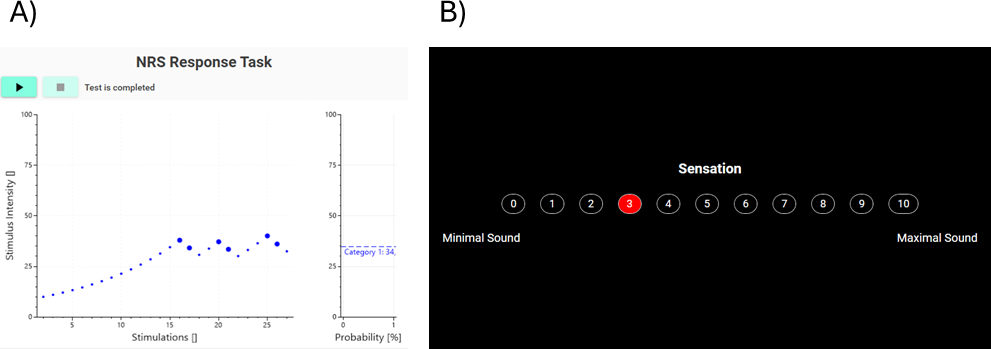
Figure 10:
Task definition
A threshold estimation test <threshold-estimation-test> can be configured to use the Interval Forced Choice response task with the <interval-forced-choice-task > element:
<interval-rating-task target="2"/>
This element has the following attributes.
| Attribute | Type | Specification |
|---|---|---|
| target | int = Calculated(tc) | Target rating for the response task. |
Required instruments
When used a IntervalScale instrument must be defined in the experimental setup and assigned to the test.
<display id="display"
    screen="secondary"
    position="fullscreen"
    normative-distance="40">

    <configurations>
        <numerical-scale id="nrs"
            experimental-setup-id="nrs"
            minimum="0"
            maximum="10"
            controller-device="joystick">
            <anchors>
                <top-anchor text="Maximal Sound" />
                <bottom-anchor text="Minimal Sound" />
            </anchors>
        </numerical-scale>
    </configurations>
</display>
These instruments must then be assigned to the test in the <device-mapping> element of the experimental setup, an example of such a device assignment is shown below:
<device-assignment device-id="display.nrs"
    test-type="psychophysics-threshold-estimation"
    test-id="NRS"
    instrument-name="IntervalScale" />
Manual Interval Rating
The Manual Interval Rating response task is a manual variant of the Interval Rating task and is conceptually identical in terms of the perceptual judgment made by the subject. A stimulus is presented, after which the operator verbally asks the subject to provide a numerical rating of the perceived stimulus intensity using a predefined interval (numerical) rating scale (e.g., 0–10). The subject responds verbally, and the operator enters the reported rating manually into LabBench.
If the entered rating meets or exceeds the specified target value, the response task returns True; otherwise, it returns False. As with other manual response tasks, the test waits indefinitely until the operator records the subject’s response. This task is illustrated in Figure 11.
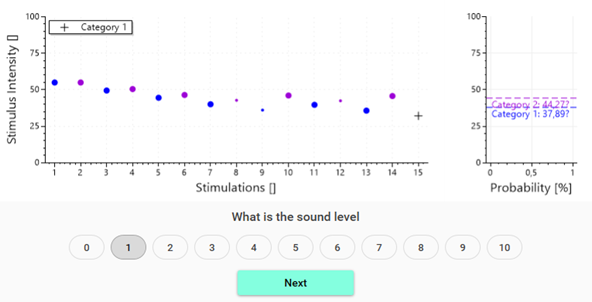
Figure 11:
By removing the requirement for a time-limited motor response, the Manual Interval Rating task eliminates time pressure on the subject. Removal of the time limit is advantageous for participants with slower reaction times, motor impairments, or difficulties interacting with input devices. As a result, missed responses due to delayed action are minimized, thereby reducing the effective lapse rate compared to the automatic version of the task.
Task definition
A threshold estimation test <threshold-estimation-test> can be configured to use the Manual Interval Rating task with the <interval-forced-choice-task > element:
<manual-interval-rating-task
    instruction="What is the sound level"
    minimum="0"
    maximum="10"
    target="1 if ChannelID == 'CH01' else 2"/>
This element has the following attributes.
| Attribute | Type | Specification |
|---|---|---|
instruction |
string | Question that the experimenter must ask to prompt the subject to rate the sensation on the interval rating scale. |
target |
int = Calculated(tc) | Target rating for the response task. |
minimum |
int | Minimum rating on the interval rating scale. Default is 0. |
maximum |
int | Maximal rating on the interval rating scale. Default is 10. |
Categorical Rating
The Categorical Rating response task is a psychophysical paradigm in which participants rate the perceived quality or intensity of a stimulus using a categorical (ordinal) scale composed of a finite set of labeled categories (e.g., none, slight, moderate, strong, intense). Unlike numerical or ratio rating tasks, categorical ratings provide ordered but not quantitatively spaced response options.
In each trial, a stimulus is presented, and the participant selects the category that best describes their perceptual experience. The selected category is then evaluated relative to a predefined target category. If the chosen category meets or exceeds the target, the response task returns True; otherwise, it returns False. The adaptive estimation algorithm uses this binary outcome to adjust stimulus intensity and converge on the level required to elicit the target categorical percept. This task is illustrated in Figure 12.
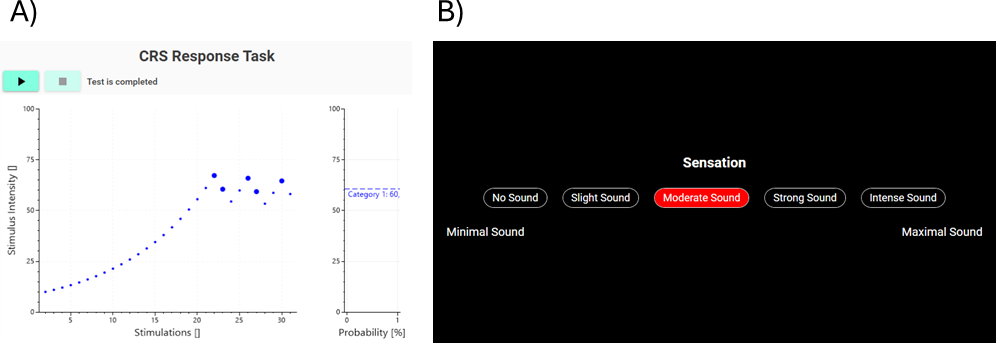
Figure 12:
Categorical rating scales are ordinal, meaning that while categories have a defined order, the perceptual distance between categories is not assumed to be equal. For example, the difference between weak and moderate may not be perceptually equivalent to the difference between moderate and strong. As a result, categorical rating tasks are best suited for identifying thresholds for qualitative perceptual transitions, rather than for fine-grained psychometric modeling.
Task definition
A threshold estimation test <threshold-estimation-test> can be configured to use the Categorical Rating response task with the <categorical-rating-task> element:
<categorical-rating-task target="2" />
This element has the following attributes.
| Attribute | Type | Specification |
|---|---|---|
| target | int = Calculated(tc) | Target rating for the response task. |
Required instruments
When used a OrdinalScale instrument must be defined in the experimental setup and assigned to the test.
<display id="display"
    screen="secondary"
    position="fullscreen"
    normative-distance="40">

    <configurations>
        <categorical-scale id="crs"
            experimental-setup-id="crs"
            controller-device="joystick">
            <anchors>
                <top-anchor text="Maximal Sound" />
                <bottom-anchor text="Minimal Sound" />
            </anchors>
            <categories>
                <category text="No Sound" />
                <category text="Slight Sound" />
                <category text="Moderate Sound" />
                <category text="Strong Sound" />
                <category text="Intense Sound" />
            </categories>
        </categorical-scale>
    </configurations>
</display>
These instruments must then be assigned to the test in the <device-mapping> element of the experimental setup, an example of such a device assignment is shown below:
<device-assignment
    device-id="display.crs"
    test-type="psychophysics-threshold-estimation"
    test-id="CRS"
    instrument-name="OrdinalScale" />
Manual Categorical Rating
The Manual Categorical Rating response task is a manual variant of the Categorical Rating task and is conceptually identical in terms of the perceptual judgment made by the subject. A stimulus is presented, after which the operator verbally asks the subject to describe their perception using a predefined categorical scale (e.g., none, slight, moderate, strong, intense). The participant responds verbally, and the operator enters the selected category manually into LabBench.
If the entered category meets or exceeds the specified target category, the response task returns True; otherwise, it returns False. As with other manual response tasks, the test waits indefinitely until the operator records the participant’s response. This task is illustrated in Figure 13.
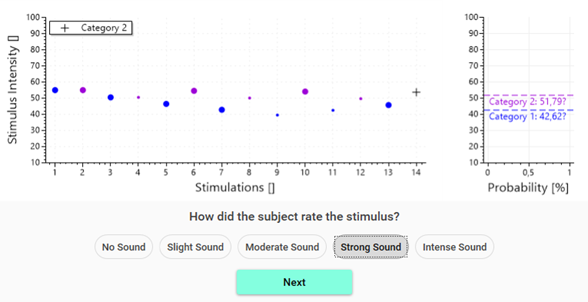
Figure 13:
A threshold estimation test <threshold-estimation-test> can be configured to use the Manual Categorical Rating response task with the <manual-categorical-rating-task> element:
<manual-categorical-rating-task
    target="1 if ChannelID == 'CH01' else 2">
    <category text="No Sound" />
    <category text="Slight Sound" />
    <category text="Moderate Sound" />
    <category text="Strong Sound" />
    <category text="Intense Sound" />
</manual-categorical-rating-task>
This element has the following attributes.
| Attribute | Type | Specification |
|---|---|---|
| target | int = Calculated(tc) | Target rating for the response task. |
| instruction | string | Question that the experimenter must ask to prompt the subject to rate the sensation on the categorical rating scale. |
each child <category> element defines a category with the following attributes:
| Attribute | Type | Specification |
|---|---|---|
| text | Dynamic Text | Description of the category. |
Stimulation
Stimulation channels allow the estimation of psychometric functions and/or thresholds for multiple stimuli concurrently within a single threshold estimation test. Each channel represents an independent stimulus condition with its own adaptive estimation algorithm and stimulus definition.
During the experiment, LabBench alternates between channels on successive trials, interleaving stimulus presentations so that each channel progresses toward its own threshold or psychometric estimate.
This interleaving ensures that multiple stimulus categories or conditions can be assessed efficiently without running separate tests, while maintaining an independent estimation state for each stimulus.
<channels>
    <channel id="CH01" name="Category 1">
        <up-down-method
            start-intensity="(Stimulator.Imax - Stimulator.Imin)/2 + Stimulator.Imin"
            initial-direction="decreasing"/>

        <stimulus>
            <sine Is="x" Ts="200" Frequency="1000" />
        </stimulus>
    </channel>
    <channel id="CH02" name="Category 2">
        <up-down-method
            start-intensity="(Stimulator.Imax - Stimulator.Imin)/2 + Stimulator.Imin"
            initial-direction="decreasing"/>

        <stimulus>
            <sine Is="x" Ts="400" Frequency="1000" />
        </stimulus>
    </channel>
</channels>
Scripting
Results from the Threshold Estimation Procedure can be accessed from calculated parameters and IronPython scripts using dot notation:
ProcedureID.Property
Properties:
| Property | Type | Description |
|---|---|---|
Completed |
bool |
True when all estimates are either available or failed. |
Failed |
bool |
True if one or more estimates failed. |
Estimates |
ThresholdEstimate[] |
List of all ThresholdEstimate objects. |
InputChannels |
string[] |
Names of input channels used during acquisition (if available). |
StimulusChannels |
string[] |
Names of stimulus channels used in the procedure. |
Threshold estimates:
Threshold values can be accessed directly using the channel ID:
value = ProcedureID["Thermal"]
# or
value = ProcedureID.Thermal
| Expression | Type | Description |
|---|---|---|
ProcedureID["ChannelID"] |
double |
Returns the computed threshold value. |
ProcedureID.ChannelID |
double |
Equivalent dot-notation access. |
If the specified channel does not exist, an error is raised.
ThresholdEstimate
Each estimate represents the result of a single adaptive procedure for a stimulus channel.
Properties:
| Property | Type | Description |
|---|---|---|
ID |
string |
Unique identifier of the estimate (channel ID). |
Name |
string |
Human-readable channel name. |
Value |
double |
Estimated threshold value. Returns NaN if the estimate failed. |
Available |
bool |
Indicates whether a valid estimate is available. |
Failed |
bool |
Indicates whether the estimation failed. |
Imin |
double |
Minimum stimulus intensity. |
Imax |
double |
Maximum stimulus intensity. |
ReactionTime |
double |
Mean reaction time across valid responses. |
ReactionTimes |
double[] |
Reaction times for trials with a response. |
ReactionTimeVariance |
double |
Variance of reaction times. |
ConfidenceAvailable |
bool |
Indicates whether confidence intervals are available. |
ConfidenceLevel |
double |
Confidence level (e.g., 0.95). |
Function |
object |
Psychometric function used for estimation. |
DataPoints |
EstimationPoint[] |
Array of EstimationPoint entries (raw trial data). |
EstimationPoint
Represents a single trial in the adaptive threshold estimation.
Properties:
| Field | Type | Description |
|---|---|---|
Response |
bool |
True if the subject responded positively. |
CatchTrial |
bool |
Indicates whether the trial was a catch trial. |
Intensity |
double |
Stimulus intensity used for the trial. |
Answer |
int |
Raw response code (task-dependent). |
ReactionTime |
double |
Reaction time in milliseconds. |
Time |
double |
Time since procedure start (milliseconds). |
Alpha |
double |
Current estimate of threshold parameter (psychometric function). |
Beta |
double |
Slope parameter of the psychometric function. |
Gamma |
double |
Guess rate parameter. |
Lambda |
double |
Lapse rate parameter. |
Confidence intervals:
If supported by the estimation algorithm, confidence intervals are available per trial:
| Property | Type | Description |
|---|---|---|
AlphaConfidenceAvailable |
bool |
Indicates if alpha confidence interval is available. |
AlphaConfidenceInterval |
object |
Confidence interval for alpha. |
BetaConfidenceAvailable |
bool |
Indicates if beta confidence interval is available. |
BetaConfidenceInterval |
object |
Confidence interval for beta. |
If confidence data is not available, default bounds are estimated internally.
Notes
ValuereturnsNaNif the estimation failed.- Reaction times only include trials with valid responses.
- Data points are stored in temporal order.
- Channel IDs are case-sensitive when accessed via scripting.
- Confidence intervals are only available when supported by the estimation algorithm.