Response Recording
The response recording test implements computerized psychophysical ratings that allow a subject to rate a sensation sampled continuously for either a fixed time or a time determined by events during the test. Computerized psychophysical ratings allow time-dependent quantification of psychophysiological responses, such as the area under the curve, the maximal rating, or the time of maximal rating. Optionally, the test can be amended to include simultaneous recording of signals, either stimuli (e.g., stimulation pressure) or biophysical signals (e.g., heart rate or galvanic skin response). It is also possible to define events that can occur during the test; this will allow the experimenter to mark the times these events occur in the test’s recorded data.
The test window for the <psychophysics-response-recording> test is shown in Figure 1. The test window consists of three areas: recorded responses, recorded signals, and events that the operator can mark. The primary purpose of the test is to record psychophysical ratings from a participant continuously. Consequently, the Recorded Responses part of the UI is always present regardless of the test definition. Recording psychophysical ratings continuously is what is termed computerized psychophysical rating scales (CoSCALE), and allows for quantifications that are not possible with conventional psychophysical ratings, such as calculation of area under the curve (AUC), time of maximal rating, maximal rating, and similar measures that require a time series of ratings from the participant.
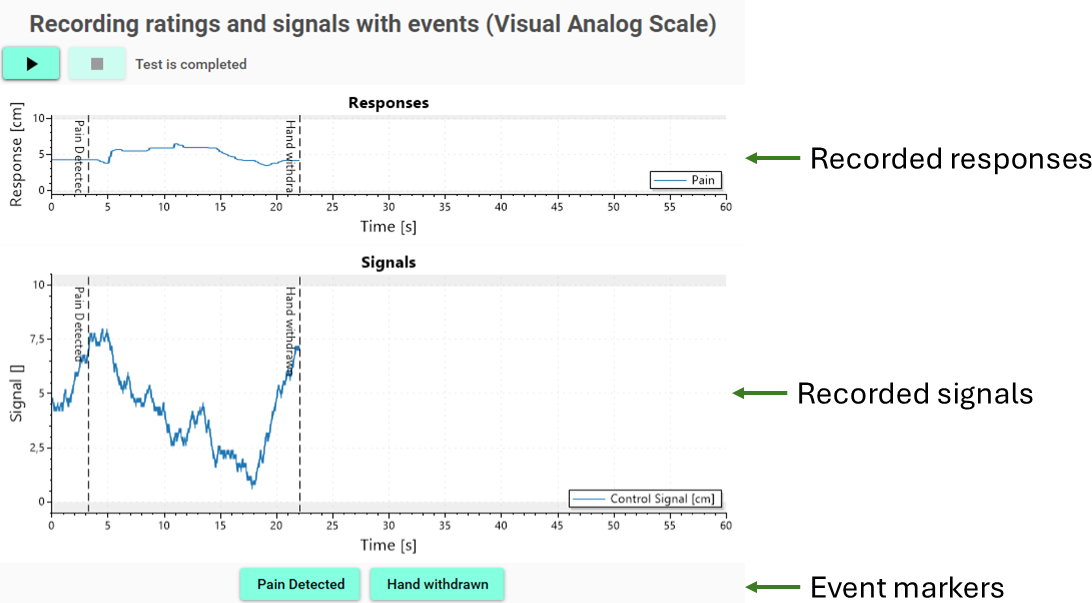 Figure 1: Test window of the response recording test
The recorded signals section of the test UI is displayed if signals are defined and the signal-weight attribute is set to a non-zero value. The test allows simultaneous sampling at the same sample rate as for the psychophysical ratings. Consequently, these sampled signals are intended for low-frequency time series signals, such as heart rate, stimulus intensity, etc.
The third section of the test UI is displayed if events are defined. Events are events that can be marked in the recording by the operator while the test is running. Events can be used to implement experimental procedures, such as a cold pressor test, where an event could mark when the hand is submerged in water, and a second event could mark when the hand is withdrawn from the water due to reaching the participant’s pain tolerance.
Test definition
A Response Recording test can be defined with the <psychophysics-response-recording> element within the <test> element in the Experiment Definition File (*.expx):
<psychophysics-response-recording id="vasRecording"
      name="Recording (Visual Analog Scale)"
      duration="60"
      sample-rate="4"
      experimental-setup-id="vas" />
Listing 1: Definition of a psychophysical recording test
The test definition in Listing 1 is the simplest test definition possible. We will later show how this test definition can be extended with signals and events.
Listing 1 has two test specific attributes:
| Attribute | Type | Specification |
|---|---|---|
| duration | double = Calculated(tc) | The duration for which ratings will be sampled. |
| sample-rate | double = Calculated(tc) | The sample rate by which ratings will be sampled. |
The general test attribute experimental-setup-id indirectly controls which type of psychophysical rating scale will be sampled. The test requires a Scales instrument to be assigned in the <device-mapping> element by the <experimental-setup>.
The Scales instrument can contain a set of psychophysical rating scales, such as Visual Analog Scales, Numerical Rating Scales, and Categorical Rating Scales. The Psychophysical Rating Test will sample all scales within the Scales instrument. Consequently, it is possible to sample multiple rating scales simultaneously; for example, it would be possible to sample two modalities, such as Itch and Pain. Please note that it is also possible to sample simultaneously different types of rating scales.
Examples of experimental setups
To use the Psychophysical Rating test, the experimental setup must contain devices that allow a participant to control and see the rating scales. In this section, two example setups are demonstrated: one setup based on the LabBench I/O and one based on a standard USB Joystick. In both examples, the scale is displayed on a second monitor, which is connected as the secondary monitor to the laboratory computer and placed in front of the participant.
LabBench I/O and LabBench DISPLAY
This experimental setup is illustrated in Figure 2. It consists of: a) a LabBench I/O to which a LabBench SCALE is attached to response port 1, b) a secondary monitor that is used to display the psychophysical rating scale to the subject, and c) a laboratory computer that runs LabBench.
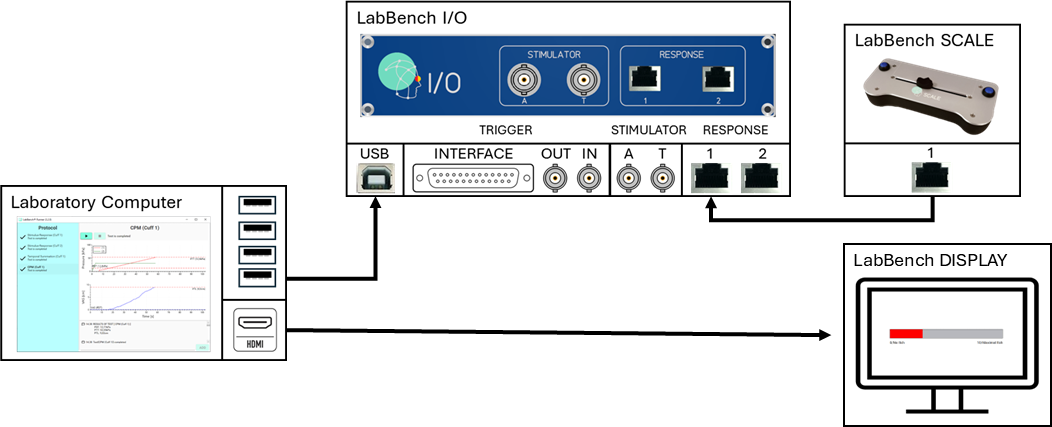
Figure 2: Computerized recording of visual analog ratings.
The subject uses the LabBench scale to control the rating scale displayed on the monitor. However, it is not used as a rating scale by itself, only to control rating scales that are defined for the secondary monitor (LabBench Display):
<display id="display"
   position="fullscreen"
   screen="secondary"
   fiducial-position="upper-right"
   normative-distance="40">

   <monitor diagonal-size="35.5" distance="40" />
   <fiducial x="17" y="17" size="10"/>

   <configurations>
      <composite-scale id="vas"
            experimental-setup-id="vas"
            controller-device="lio.scale">
            <visual-analog-scale id="pain" length="10">
               <anchors>
                  <modality text="Pain" />
                  <top-anchor text="10/Worst possible pain" />
                  <bottom-anchor text="0/No pain" />
               </anchors>
            </visual-analog-scale>
      </composite-scale>
   </configurations>
</display>
Assigning the device to the Scales instrument name will make Psychophysical Rating tests use this VAS scale for recording the psychophysical ratings. This is accomplies with the following <device-assigmment> in the <device-mapping> element in the experimental setup:
<device-mapping>
      <device-assignment device-id="display.vas" instrument-name="Scales"  />
</device-mapping>
Using a LabBench SCALE as the controlling device provides a better haptic feedback and more intuitive control of the ratings than with a USB Joystick based setup. For studies involving stimuli, a LabBench I/O-based setup also enables control of electrical stimulators and precise synchronization between visual stimuli and other stimulus modalities, such as pressure or thermal stimuli.
An implementation of this experimental setup can be seen in the Introduction to Computerized Psychophysical Rating Scales (CoScale) (please note clicking this link will leave this site) protocol in the LabBench Protocol Repository.
USB Joystick
USB-based experimental setups provide a low-cost, highly versatile solution for recording psychophysical ratings. This setup is illustrated in Figure 2 and consists of: a) a standard USB-based joystick, b) a secondary monitor that is used to display the psychophysical rating scale to the subject, and c) a laboratory computer that runs LabBench.
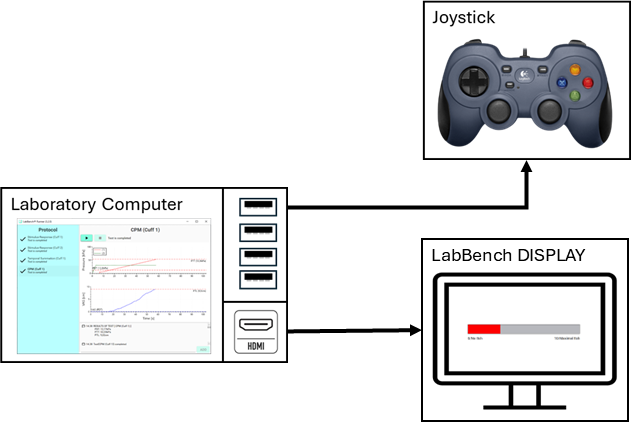
Figure 3: Computerized recording of visual analog ratings.
The definition of the LabBench DISPLAY (secondary monitor) is identical to its configuration in a LabBench I/O-based experimental setup; the only difference is that its controller-device is set to a joystick instead of a response device (LabBench SCALE or LabBench PAD) attached to a LabBench I/O.
An implementation of this experimental setup can be seen in the Introduction to Computerized Psychophysical Rating Scales (CoScale) (please note clicking this link will leave this site) protocol in the LabBench Protocol Repository.
LabBench I/O
It is also possible to use an experimental setup consisting of only a LabBench I/O and an attached LabBench SCALE. In that case, only Visual Analog Ratings can be recorded, and the scale must be attached to the LabBench SCALE.
Psychophysical rating scales
The type of Psychophysical Ratings that are sampled by the test is controlled by which scales are defined for the Scales instrument that is assigned to the test in the <device-mapping> element of the <experimental-setup>. In this section, it is assumed that the scales will be shown on an external monitor and, consequently, will be defined in the <configurations> element of a LabBench DISPLAY (<display> element) in the experimental setup.
Ratio rating Scales
The most widely used implementation of a ratio rating scale is the Visual Analog Scale (VAS), illustrated in Figure 4. The subfigure on the left shows what will be displayed to the subject, and the subfigure on the right shows the test UI during VAS rating recording.
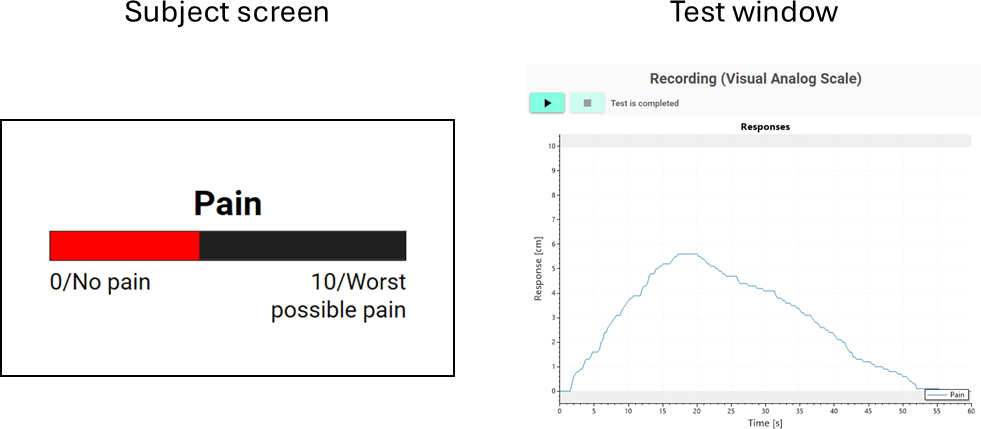 Figure 4: Computerized recording of visual analog ratings.
The code listing below shows how this scale is defined in the Experiment Definition File for the Introduction to Computerized Psychophysical Rating Scales (CoScale) (please note clicking this link will leave this site) protocol.
<composite-scale id="vas"
      experimental-setup-id="vas"
      controller-device="lio.scale">
      <visual-analog-scale id="pain"
         length="10"
         sample-period="200"
         timing-source="none">
         <anchors>
            <modality text="Pain" />
            <top-anchor text="10/Worst possible pain" />
            <bottom-anchor text="0/No pain" />
         </anchors>
      </visual-analog-scale>
</composite-scale>
Interval rating scales
The most widely used implementation of a interval rating scale is the Numerical Rating Scale (NRS), illustrated in Figure 5. The subfigure on the left shows what will be displayed to the subject, and the subfigure on the right shows the test UI during NRS rating recording.
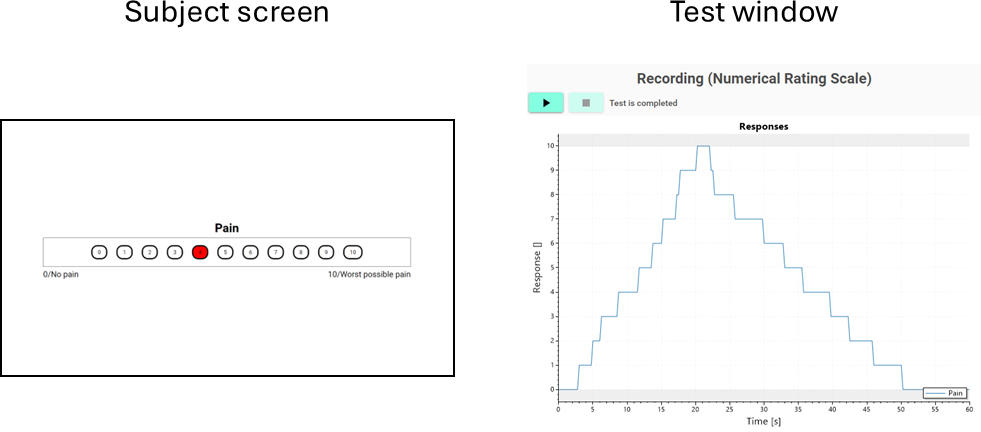
Figure 5: Computerized recording of numerical ratings.
The code listing below shows how this scale is defined in the Experiment Definition File for the Introduction to Computerized Psychophysical Rating Scales (CoScale) (please note clicking this link will leave this site) protocol.
<composite-scale id="nrs"
      experimental-setup-id="nrs"
      controller-device="lio.scale">
      <numerical-scale id="nrs"
         minimum="0"
         maximum="10"
         sample-period="200"
         timing-source="none">
         <anchors>
            <modality text="Pain" />
            <top-anchor text="10/Worst possible pain" />
            <bottom-anchor text="0/No pain" />
         </anchors>
      </numerical-scale>
</composite-scale>
Categorical rating scales
A categorical rating scale (CRS), illustrated in Figure 6. The subfigure on the left shows what will be displayed to the subject, and the subfigure on the right shows the test UI during CRS rating recording.
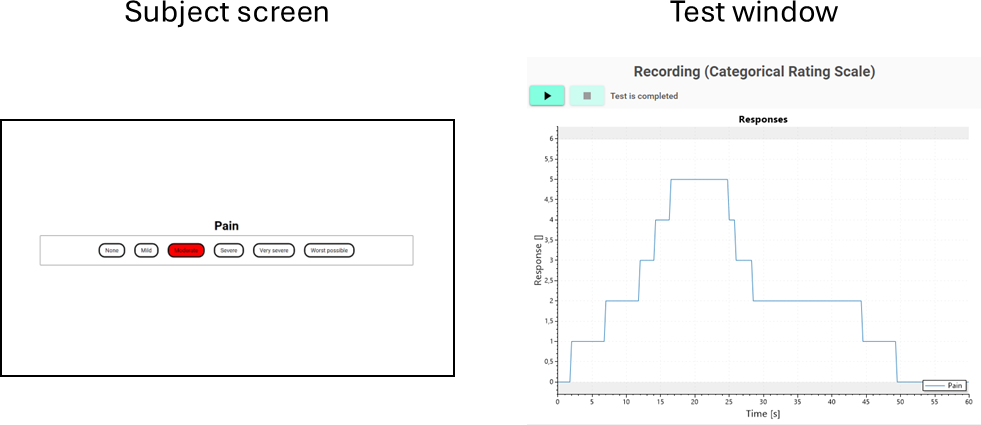
Figure 6: Computerized recording of categorical ratings.
The code listing below shows how this scale is defined in the Experiment Definition File for the Introduction to Computerized Psychophysical Rating Scales (CoScale) (please note clicking this link will leave this site) protocol.
<composite-scale id="crs"
      experimental-setup-id="crs"
      controller-device="lio.scale">
      <categorical-scale id="pain">
         <anchors>
            <modality text="Pain" />
            <top-anchor text="10/Worst possible pain" />
            <bottom-anchor text="0/No pain" />
         </anchors>
         <categories>
            <category text="None" />
            <category text="Mild" />
            <category text="Moderate" />
            <category text="Severe" />
            <category text="Very severe" />
            <category text="Worst possible" />
         </categories>
      </categorical-scale>
</composite-scale>
Sampling of signals
The response recording test provides a mechanism for sampling a set of signals simultaneously with the psychophysical ratings. Sampling signals is specified in the <signals> element, allowing the definition of a calculated parameter (sample) that is called each time the ratings are sampled.
The definition of a signal to be sampled is illustrated in the code listing below:
<psychophysics-response-recording id="vasSignals"
      name="Recording ratings and signals (Visual Analog Scale)"
      duration="60"
      sample-rate="20"
      response-weight="1"
      signal-weight="1"
      experimental-setup-id="vas">
      <test-events>
         <instrument interface="ratio-scale" />
      </test-events>
      <signals sample="Walk.Sample()" min="0" max="10">
         <signal id="CTRL" name="Control Signal" unit="cm" />
      </signals>
</psychophysics-response-recording>
In this example, a method Sample is called on an object named Walk, which must return an array with the same number of elements and in the same order as the <signal> elements that are defined within the <signals> element. For plotting purpose the minimum and maximal values for all of these signals are specified with the min and max attributes, respectively.
Each sampled signal is defined with a <signal> element within the <signals> element. The <signal> element has three attributes: id: an identifier that will be used to identify the signal in the data set and from calculated parameters, name: a readable name that will be used for plotting the signals in the test UI, and unit: the unit of the signal.
The Sample class method uses a rating from a Ratio Scale as the control input for a random walk process that simulates a biological signal. The Rating Scale instrument becomes available to the calculated parameter by adding it as a required instrument to the <test-events> for the test. Please note that in this case, no actual test events are implemented; the <test-events> element is used only to declare instruments for the <signals> element.
The Python code that implements this random walk process is shown below:
import random

class RandomWalk:
   def __init__(self, tc):
      self.tc = tc
      self.value = 0

   def Sample(self):
      scale = self.tc.Instruments.RatioScale
      x = scale.GetRatioRating() / scale.Length
      self.value = self.value - 0.2 if random.random() < x else self.value + 0.2
      self.value = max(0, min(scale.Length, self.value))
      return [self.value]

def CreateRandomWalk(tc):
   return RandomWalk(tc)
This RandomWalk class is created as a define in the protocol, as shown below:
<defines>
   <define name="Walk" value="func: Script.CreateRandomWalk(tc)" />
</defines>
The code in this example is contrived, so its example protocol would not require any additional equipment beyond what is needed for psychophysical ratings. More real-world examples are shown in the example protocols below, which demonstrate how this test can be used, for example, to implement offset analgesia protocols with a cuff pressure algometer or an electrical stimulator.
Marking of events
Recorded ratings can be annotated with events, which the operator manually inserts when they observe them or when the participant communicates them. These events can be used to end a recording manually (completed=true), meaning the recording time can vary depending on the test outcome. Events are grouped into <group> elements, where each event can specify with its next-group attribute which group will become active when an event occurs. Event groups are used to enforce logical sequences of event occurrences. If there is no logical sequence of events, but all events can occur at any time, then only one group is defined in the <event-markers> element.
Below is an example of events defined for a cold-pressor test:
<psychophysics-response-recording id="vasEvents"
      name="Recording with events (Visual Analog Scale)"
      duration="60"
      sample-rate="4"
      response-weight="1"
      signal-weight="0"
      experimental-setup-id="vas">
      <events-makers>
         <group id="PDT">
            <marker id="PDT" name="Pain Detected" next-group="PTT" />
            <marker id="STOP" name="Hand withdrawn" complete="true" />
         </group>
         <group id="PTT">
            <marker id="STOP" name="Hand withdrawn" complete="true" />
         </group>
      </events-makers>
</psychophysics-response-recording>
Signals can be recorded together with events being marked, which can be accomplished by defining both <signals> and <events-makrer> elements for the test definition. This is illustrated in the code listing below:
<psychophysics-response-recording id="vasCombined"
      name="Recording ratings and signals with events (Visual Analog Scale)"
      duration="60"
      sample-rate="20"
      response-weight="1"
      signal-weight="2"
      experimental-setup-id="vas">
      <test-events>
         <instrument interface="ratio-scale" />
      </test-events>
      <events-makers>
         <!-- Event definitions are omited for brevity. -->
      </events-makers>
      <signals sample="Walk.Sample()" min="0" max="10">
         <signal id="CTRL" name="Control Signal" unit="cm" />
      </signals>
</psychophysics-response-recording>
Scripting (Properties)
In addition to the properties that are common to all test results, the test result for the response recording test has the following test specific properties:
| Name | Type | Specification |
|---|---|---|
NumberOfSamples |
int | Specified number of samples. The actual number of recorded samples might be lower if the recording has been ended by an event marker |
SampleRate |
double | Sample rate for the ratings and if defined signals. |
Responder |
bool | True if the recording has been ended with an event marker. |
Recordings |
List<ResponseRecording> |
List of recorded responses. |
SignalRecordings |
List<SignalRecording> |
List of recorded signals. |
Markers |
List<EventMarkerRecording> |
List of marked events. |
Time |
double[] |
Time points for the recorded ratings and signals. |
ResponseRecording
| Name | Type | Specification |
|---|---|---|
Modality |
string |
Modality of the ratings (for example, Pain, Itch, or similar). |
ScaleType |
string |
Either Ordinal, Interval, or Ratio. |
SampleRate |
double |
Sample rate for the ratings. |
Length |
int |
Number of samples in the recording. |
[n] |
double |
Returns the n’th sample, where n must be less than Length. |
Area |
double |
Area under the curve. |
Maximum |
double |
Maximum rating during the recording. |
TimeMaximum |
double |
Time of the maximum rating. |
Duration |
double |
Time where the rating was different from zero. |
SignalRecording
| Name | Type | Specification |
|---|---|---|
ID |
string |
ID of the signal as specified in its <signal> element. |
Name |
string |
Name of the signal as specified in its <signal> element. |
Minimum |
double |
Minimum for all signals as specified in the <signals> element. |
Maximum |
double |
Maximum for all signals as specified in the <signals> element. |
Unit |
string |
Stimulus unit as specified in its <signal> element. |
Values |
List<double> |
Recorded signal values. |
EventMarkerRecording
| Name | Type | Specification |
|---|---|---|
ID |
string |
ID of the signal as specified in its <marker> element. |
Name |
string |
Name of the signal as specified in its <marker> element. |
Time |
double |
Time that the event occured. |
Example protocols
- Introduction to Computerized Psychophysical Rating Scales (CoScale) (please note clicking this link will leave this site).