Stimulus Presentation
The Stimulus Presentation procedure allows a participant to become familiar with a stimulus and to rate its sensation on a psychophysical rating scale.
The procedure can also be used to manually find thresholds, as the last tested intensity is available
in the calculated parameter [ProcedureID].Intensity upon completion.
The procedure window for the
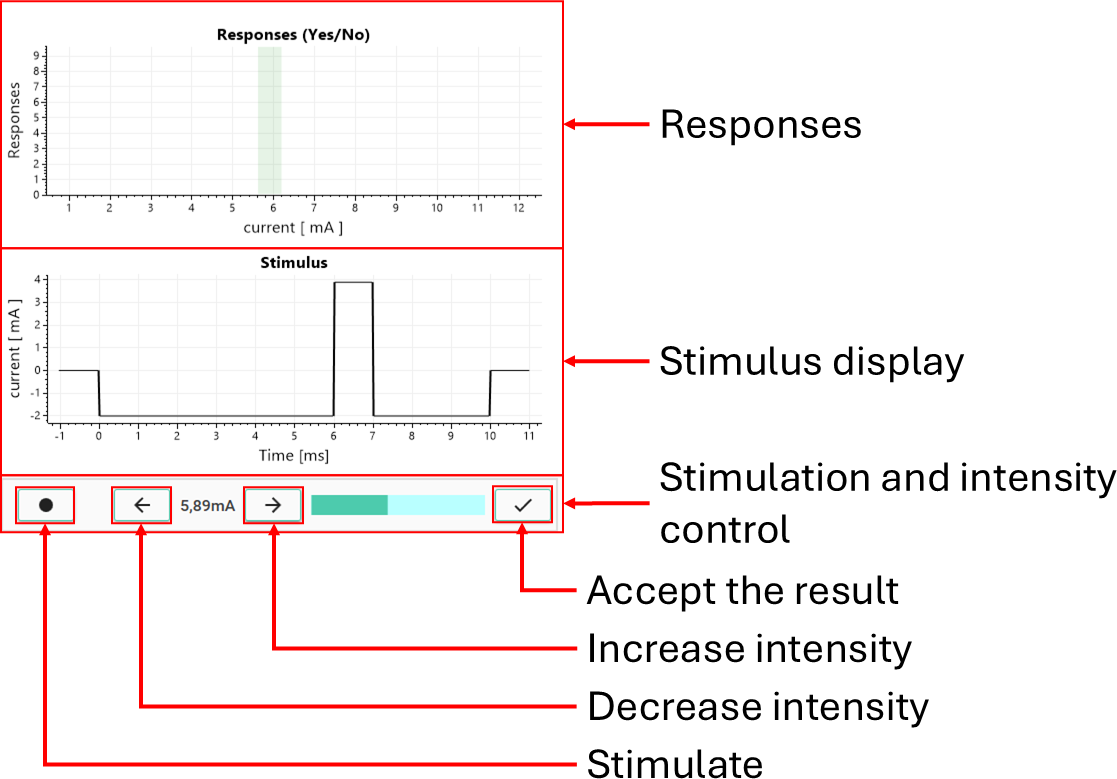
Figure 1: Procedure window of the stimulus presentation procedure
- The responses panel (top) displays the recorded responses as a function of stimulus intensity. For yes/no responses, this is shown as discrete outcomes at each tested intensity, allowing the experimenter to visually assess detection behavior across intensities.
- The stimulus display (middle) shows the waveform of the currently selected stimulus. This provides a real-time representation of the signal that will be delivered, including its temporal structure and amplitude.
- The control panel (bottom) allows the experimenter to interact with the procedure:
- Stimulate (●) triggers delivery of the stimulus and associated triggers.
- Decrease intensity (←) selects the previous intensity in the predefined range.
- Increase intensity (→) selects the next intensity.
- The current intensity value is displayed numerically.
- The intensity bar provides a visual indication of the position within the intensity range.
- Accept (✓) completes the procedure and stores the result.
During execution, the experimenter selects an intensity, delivers the stimulus, and optionally records a response. This process can be repeated across intensities, allowing exploration of the stimulus-response relationship.
Procedure definition
A Stimulus Presentation procedure can be defined with the <psychophysics-stimulus-presentation> element:
<psychophysics-stimulus-presentation id="customStimulus"
    name="Custom stimulation"
    experimental-setup-id="image"
    stimulus-update-rate="20000">
    <intensity type="linspace" x0="Stimulator.Max/10" x1="Stimulator.Max" n="10"/>

    <configuration>
        <trigger-generation trigger-source="internal" />
        <stimulation-generation trigger-source="response-port01"/>
    </configuration>

    <responses  response-collection="yes-no"/>

    <triggers>
        <trigger duration="1">
            <code output="trigger-output" />
        </trigger>
    </triggers>

    <stimulation>
        <scripts initialize="func: Script.Initialize(contect)"
                    stimulate="func: Script.Stimulate(context, x)">
            <instrument interface="stimulator" />
            <instrument interface="image-display" />
        </scripts>
        <stimulus>
            <pulse Is="x" Ts="1" Tdelay="0" />
        </stimulus>
    </stimulation>
</psychophysics-stimulus-presentation>
The example above demonstrates a stimulus presentation procedure that combines stimulus generation, trigger generation, response collection, and custom scripting to implement synchronized multi-modal stimulation. The stimuli is generated with the following Python code:
def Initialize(contect):
    return True

def Stimulate(context, x):
    context.Instruments.Stimulator.Generate("port2", context.Stimulus)
    context.Instruments.ImageDisplay.Display(context.Assets.Images.Cue, 250, True)
    return True
Trigger and stimulus generation are configured to be synchronised. The trigger generation component is set to internal, meaning it waits for the stimulus generation to be executed. The stimulation generation component is triggered by an external event on response-port01, ensuring that both trigger and stimulus generation are aligned with a hardware event.
A simple trigger is defined that outputs a signal on trigger-output for 1 ms. This can be used to mark stimulus onset or synchronise external devices. The stimulation is defined as a pulse stimulus with intensity x and duration 1 ms. The intensity x is provided by the current value from the intensity range.
In addition to the standard stimulus definition, custom scripting is used to control how the stimulus is delivered. The <scripts> element exposes the stimulator and image-display instruments to Python code. The defined stimulus is evaluated and made available as context.Stimulus, allowing the script to deliver the waveform while simultaneously presenting visual feedback or cues.
Responses are collected using a yes/no paradigm, allowing the participant to indicate whether the stimulus was perceived. Each stimulation can therefore be associated with a binary response, supporting manual threshold estimation.
This example illustrates how stimulus and trigger generation components, together with scripting, can be combined to implement synchronised, multi-modal stimulation paradigms with flexible experimental control.
Procedure attributes
The <psychophysics-stimulus-presentation> has the following procedure specific attributes:
| Attribute | Type | Specification |
|---|---|---|
stimulus-update-rate |
int = Calculated(tc) | Update rate in Hz for stimulus generation. Must be supported by the stimulation device. |
trigger-update-rate |
int = Calculated(tc) | Update rate in Hz for trigger generation. If unspecified, the stimulus update rate is used. |
Intensity control
The <intensity> element defines the set of stimulus intensities available during the procedure:
<intensity type="linspace" x0="Stimulator.Max/10" x1="Stimulator.Max" n="10"/>
These values are generated before the procedure starts using an array generation algorithm and can be navigated manually during execution. The generated intensities form a discrete set of values that the experimenter can step through using the procedure controls. The currently selected intensity is passed to stimulation and trigger expressions as x.
The <intensity> element has the following attributes:
| Attribute | Type | Specification |
|---|---|---|
type |
enum | Algorithm used to generate intensities. |
n |
double = Calculated(context) | Number of values to generate (rounded down to integer). |
x0 |
double = Calculated(context) | Start value of the intensity range. |
x1 |
double = Calculated(context) | End value of the intensity range. |
base |
double = Calculated(context) | Base used for logspace generation. |
value |
double[] = Calculated(context) | Explicit array of intensities when using array. |
The intensities are generated using one of the following algorithms, specified by the type attribute:
| Type | Description |
|---|---|
linspace |
Generates n values linearly spaced between x0 and x1 (inclusive). |
logspace |
Generates values as base^x, where x is linearly spaced between x0 and x1. |
geomspace |
Generates n values geometrically spaced between x0 and x1 (constant ratio progression). |
array |
Uses a user-defined array from a calculated parameter (double[]). |
Notes:
- All attributes support calculated parameters and are evaluated in the procedure context.
- Generated values must be finite (no NaN or infinity).
- The first generated value is used as the initial intensity when the procedure starts.
- The experimenter can step through the generated intensities using the UI controls.
- The currently selected intensity is stored in the result and accessible after completion.
Sampling of psychophysical responses
The stimulus presentation procedure supports optional collection of psychophysical responses through the <responses> element. The type of responses collected is defined by the response-collection attribute, which determines both the response modality and the required instrument.
Response modes:
| Value | Description |
|---|---|
none |
No response collection. No response device is required. |
yes-no |
Binary responses using a response button. |
numerical-rating |
Interval scale ratings (e.g., NRS). |
ratio-rating |
Continuous ratings (e.g., VAS). |
categorical-rating |
Ordinal ratings with discrete categories. |
Responses are sampled in connection with each stimulation:
- When a stimulus is delivered, the response system is reset
- A new response data point is created and associated with the current intensity
- The response device is then sampled during execution
- The sampled value is stored together with the stimulus intensity
This establishes a direct mapping between stimulus intensity → participant response.
Response acquisition
The method of sampling depends on the selected response mode:
-
Yes/No (button-based)
A latched button press is detected and recorded as a binary response:- Pressed →
1 - Not pressed →
0
The button is reset after sampling to prepare for the next stimulation.
- Pressed →
-
Ratio rating (e.g., VAS)
The current continuous value of the scale is sampled. -
Numerical rating (e.g., NRS)
The selected numerical value is sampled. -
Categorical rating (ordinal)
The selected category index is sampled.
Each response mode defines a valid response range:
- Yes/No:
[0, 1] - Ratio scale:
[0, scale length] - Numerical scale:
[minimum, maximum] - Categorical scale:
[0, number of categories]
These ranges are determined automatically from the connected instrument.
Notes:
- A response device is only required if a response mode is specified.
- Responses are linked to the intensity index used during stimulation.
- Sampling is continuous for rating scales and event-driven for button responses.
- The response engine ensures that the correct instrument type is validated and used for each response mode.
Generation of stimuli and triggers
Stimulus and trigger generation in the stimulus presentation procedure are implemented using the standard procedure components described in the section on Procedure components. These components define how stimuli (<stimulation>) and triggers (<triggers>) are specified, composed, and executed.
The procedure delegates all waveform definition, trigger routing, and synchronisation to these components. As a result, stimuli can be defined using the full set of supported stimulus elements (e.g., <pulse>, <ramp>, <sine>, <arbitrary>, <combined>, <repeated>), and triggers can be composed and scheduled using the corresponding trigger elements.
Synchronization between stimulus and trigger generation is controlled through the <configuration> element, where the trigger-source attributes determine how and when each component is executed. Correct configuration ensures that triggers and stimuli are aligned in time and, if required, synchronised with external hardware events.
The current intensity selected in the procedure is passed as the free parameter x to both stimulus and trigger definitions, allowing the generated signals to depend directly on the chosen intensity level.
For details on available stimulus types, trigger composition, and synchronisation mechanisms, refer to Procedure components.
Manual threshold estimation
The procedure can be used for manual threshold estimation:
- The experimenter increases or decreases intensity based on participant feedback
- The final selected intensity is stored in the result
- This value can be accessed in calculated parameters as:
[ProcedureID].Intensity
Scripting
The result of the stimulus presentation procedure provides access to the tested intensities and the corresponding responses. These properties can be used in calculated parameters to analyse stimulus-response relationships, estimate thresholds, or drive adaptive procedures.
| Name | Type | Description |
|---|---|---|
| Intensity | double | The last selected stimulus intensity. |
| ResponseCollection | enum | The response mode used during the procedure (e.g., none, yes-no, numerical, ratio, categorical). |
| MaximalResponse | double | The maximal possible response value determined by the response device. |
| Responses | List |
Collection of responses grouped by stimulus intensity. |
| Completed | bool | Always true for this procedure. |
| Failed | bool | Always false for this procedure. |
Notes:
- Responses are grouped by intensity, enabling direct construction of stimulus-response curves.
- Multiple responses can be recorded per intensity.
- For yes/no responses, values are typically
0(no) or1(yes). - For rating scales, values correspond to the scale range defined by the instrument.
- The result exposes both aggregated responses and raw response samples for flexible analysis.
ResponseData
Each ResponseData element corresponds to a specific stimulus intensity and contains all responses recorded at that level.
| Name | Type | Description |
|---|---|---|
| Intensity | double | The stimulus intensity associated with this set of responses. |
| Samples | int | Number of responses recorded at this intensity. |
| Responses | List |
List of individual response samples. |
ResponseDataPoint
| Name | Type | Description |
|---|---|---|
| Value | double | Recorded response value for a single stimulation. |